Skip to primary content
Skip to secondary content

Passion Dynamics

Microsoft Power Platform & Azure blog by Rawish Kumar

Passion Dynamics

Main menu

  • Home
  • About Me
  • Contact

Tag Archives: count child records using javascript

Count Related Child Record Created In Last X Days (Rollup Field Limitation)

Posted on April 27, 2018 by Rawish Kumar Prajapati
Reply

I have recently posted a blog where i have showed to you guys how a rollup field can be useful if you need to count related child records : https://rawishblog.wordpress.com/2018/04/24/count-the-number-of-related-child-records-using-a-rollup-field/

however, everything has its limitation, in this case rollup field will not give you an option to to filter record from last x days or from a specific time period.

lets for e.g you needed to count records which are created in specific time period? may last 50 days or 90 days. Thats where you will have to move on and search for other methods – i have come up with a simple supported combination of WebApi + FetchXML.

in this example i am going count related cases for an account.

  1. Create a whole number field and put this on the form
  2. Use below script :
    function CountRecords() {
    
    var recordId = Xrm.Page.data.entity.getId();
    
    var fetchXml = "<fetch mapping='logical' distinct='false' aggregate='true'>"
     + "<entity name='incident'>"
     + "<attribute name='title' alias='recordcount' aggregate='count' />"
     + "<filter type='and'>"
     + "<condition attribute='createdon' operator='last-x-days' value='100' />"
     + "</filter>"
     + "<link-entity name='account' from='accountid' to='customerid' link-type='inner' alias='ab'>"
     + "<filter type='and'>"
     + "<condition attribute='accountid' operator='eq' value='" + recordId + "' />"
     + "</filter>"
     + "</link-entity>"
     + "</entity>"
     + "</fetch>";
    
    var fetch = encodeURI(fetchXml);
     var entityname = "incidents";
     var serverURL = Xrm.Page.context.getClientUrl();
     var Query = entityname + "?fetchXml=" + fetch;
     var req = new XMLHttpRequest();
     req.open("GET", Xrm.Page.context.getClientUrl() + "/api/data/v9.0/" + Query, false); //
     req.setRequestHeader("Accept", "application/json");
     req.setRequestHeader("Content-Type", "application/json; charset=utf-8");
     req.setRequestHeader("OData-MaxVersion", "4.0");
     req.setRequestHeader("OData-Version", "4.0");
     req.send();
     if (req.readyState == 4)
     {
     req.onreadystatechange = null;
     if (200 == req.status) {
     var results = JSON.parse(req.response);
     var records = results.value[0].recordcount;
     Xrm.Page.getAttribute("new_totalcasescount").setValue(records);
     }
     else {
     console.log(req.statusText);
     }
     }
     }


  3. Call this function on on load of your account – it will fetch the related cases and fill the newly created field.
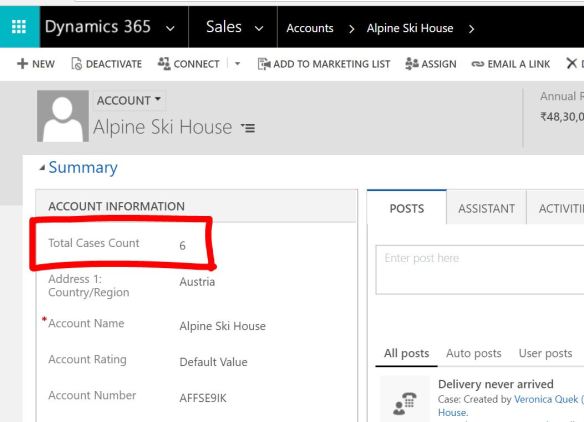
    you will the field has updated on Onload of the form :
    1


few things :

  • You can get the required fetch XML from advanced find if you need to apply on other entities or with other condition.
  • You can use this field to put on views however it might give you the updated information as the script runs on -onload of the form and update the value. Hence , if you need that functionality – please go for a plugin.


i hope this helps.


Share this:

  • Share on X (Opens in new window) X
  • Share on Facebook (Opens in new window) Facebook
Like Loading...
Posted in CRM WebApi/Javascript, Uncategorized | Tagged Author:Rawish, count child records using javascript, Count Related Child Record Created In Last X Days, Count Related Child Record Created In Last X Days (Rollup Field Limitation), count related opportunities created in last x days, CRM, crm javascript, how to count child records and show on parent record created in last 1 month, how to count related cases of an account created in last x days, how to count related records created in last 1 month, javascript to count record, Microsoft Dynamics CRM, rollup field, rollup field limitation, web API | Leave a reply
Follow Passion Dynamics on WordPress.com

I'm not an expert; I'm learning!

Top Posts & Pages

  • How to insert dynamic values from custom entities in an email template - Microsoft Dynamics CRM
  • About Me
  • An unsecured or incorrectly secured fault was received from the other party
  • A bit About "Post" In Dynamics 365 CE
  • Create Auto-Number Attribute In Dynamics CRM 365 Using Organization Service + Simple Console Application
  • Alternate Keys
  • Audit History
  • Business Rules
  • Calculated & Rollup Fields
  • Certifications
  • CRM Code Helpers
  • CRM WebApi/Javascript
  • Data Migration
  • Deployment
  • Dynamics 365 For Marketing
  • Dynamics CRM 365 Online
  • Dynamics Portal
  • Microsoft Dynamics CRM Emails
  • Microsoft Dynamics CRM Reporting
  • Microsoft Dynamics CRM SDK
  • Microsoft Dynamics CRM Services
  • Microsoft Dynamics CRM Solutions
  • Reblogged
  • Uncategorized
  • Unified Service Desk for Dynamics CRM
  • Voice Of Customer
  1. Galusz Marton's avatar
    Galusz Marton on Get User’s Teams Using WebApi JavaScript In Dynamics 365September 11, 2024

    For anyone still struggling to retrieve only the Teams that a specific user belongs to, you can filter the returned…

  2. CRM Web Service - Appstore on When To Use Which Microsoft Dynamics CRM Web ServiceMay 27, 2023

    […] source image:passion4dynamics […]

  3. Jessica's avatar
    Jessica on Search For Privilege Name Using Privilege IdMay 2, 2023

    Awesome! Thanks so much for this post!

  4. Alessandro's avatar
    Alessandro on Get Selected Record Information From Main View Or A Subgrid In Dynamics 365April 19, 2023

    Hi, do you know whether it works on Canvas App modals?

  5. Tamilselvan's avatar
    Tamilselvan on Dynamics 365 For Marketing – Retrieve Contacts From A SegmentDecember 23, 2022

    Ok, Got it... To access this schema information, Marketing app has to be installed. It was explained in the MS…

Create a website or blog at WordPress.com
  • Subscribe Subscribed
    • Passion Dynamics
    • Join 47 other subscribers
    • Already have a WordPress.com account? Log in now.
    • Passion Dynamics
    • Subscribe Subscribed
    • Sign up
    • Log in
    • Report this content
    • View site in Reader
    • Manage subscriptions
    • Collapse this bar
 

Loading Comments...
 

    %d