
This is a very common and simple requirement you will get in CRM wherein you have to find a way to send email to customers whose birthday is today. whilst you can achieve this functionality without any code ( workflows + custom fields/entities) but today i will be providing/showing a sample code on how to do that.
This is a simple console application which you can schedule to run every day at specific time.
Required
- LinqKit ( you can download from Nuget Manager & add under references)
- Early Bound Class
Code
Main Program.cs :
using System;
using System.Linq;
using Microsoft.Xrm.Sdk;
using Microsoft.Xrm.Tooling.Connector;
using System.Net;
using System.Configuration;
using Microsoft.Xrm.Sdk.Client;
using EarlyBound;
using LinqKit;

namespace BirthdayEmail
{
 class Program
 {
 static void Main(string[] args)
 {
 ServicePointManager.SecurityProtocol = SecurityProtocolType.Tls12;
 CrmServiceClient crmConn = new CrmServiceClient(ConfigurationManager.ConnectionStrings["CRM"].ConnectionString);

IOrganizationService crmService = crmConn.OrganizationServiceProxy;

OrganizationServiceContext orgContext = new OrganizationServiceContext(crmService);


//use linqkit to build predicate
var predicate = PredicateBuilder.False<Contact>();
 for (int i = Math.Min(140, DateTime.Today.Year - 1900); i > -1; i--)
 {
 DateTime cleanDateTime = new DateTime(DateTime.Today.AddYears(-i).Year, DateTime.Today.AddYears(-1).Month, DateTime.Today.AddYears(-i).Day);
 predicate = predicate.Or(p => p.BirthDate == cleanDateTime.ToUniversalTime());
 }
 var getBirthdays = (from c in orgContext.CreateQuery<Contact>().AsExpandable().Where(predicate)
 select c).ToList();

foreach (var ent in getBirthdays)
 {
 Guid _contactid = ent.Id;

Helper helper = new Helper();
 helper.CreateRequiredRecords(crmService, _contactid);

}
 }
 }
}
helper
using System;
using System.Text;
using Microsoft.Xrm.Sdk;
using Microsoft.Crm.Sdk.Messages;
using EarlyBound;


namespace BirthdayEmail
{
 class Helper
 {
 public void CreateRequiredRecords(IOrganizationService crmService, Guid _contactid)
 {

WhoAmIRequest systemUserRequest = new WhoAmIRequest();
 WhoAmIResponse systemUserResponse = (WhoAmIResponse)crmService.Execute(systemUserRequest);
 var userId = systemUserResponse.UserId;

// Create 'From' activity party for the email

ActivityParty fromParty = new ActivityParty
 {
 PartyId = new EntityReference(SystemUser.EntityLogicalName,userId)
 };

// Create 'To' activity party for the email

ActivityParty toParty = new ActivityParty
 {
 PartyId = new EntityReference(Contact.EntityLogicalName, _contactid)
 };


 //format the description field - optional

StringBuilder description = new StringBuilder();
 description.Append("Dear Customer <br/> <br/>");
 description.Append("Wish you a very happy birthday and great life ahead. <br/> <br/>");
 description.Append("Regards, <br/>");
 description.Append("Rawish");


// Create an e-mail message
 Email email = new Email
 {
 To = new ActivityParty[] { toParty },
 From = new ActivityParty[] { fromParty },
 Subject = "Happy Birthday!",
 Description = description.ToString(),
 DirectionCode = true,
 };

Guid _emailId = crmService.Create(email);

 //Send Email

SendEmailRequest sendEmail = new SendEmailRequest
 {
 EmailId = _emailId,
 TrackingToken = "",
 IssueSend = true
 };

SendEmailResponse response = (SendEmailResponse)crmService.Execute(sendEmail);

if (response != null)
 {
 Console.WriteLine("completed!");

 }
 }
 }
}
App.Config
<?xml version="1.0" encoding="utf-8"?>
<configuration>
 <configSections>
 <!-- For more information on Entity Framework configuration, visit http://go.microsoft.com/fwlink/?LinkID=237468 -->
 <section name="entityFramework" type="System.Data.Entity.Internal.ConfigFile.EntityFrameworkSection, EntityFramework, Version=6.0.0.0, Culture=neutral, PublicKeyToken=b77a5c561934e089" requirePermission="false" />
 </configSections>
 <connectionStrings>
 <add name="CRM" connectionString="AuthType=Office365; Username= rawish.kumar@passiond.onmicrosoft.com; Password=password;Url=https://passiond.crm8.dynamics.com" />
 </connectionStrings>
 <startup>
 <supportedRuntime version="v4.0" sku=".NETFramework,Version=v4.5.2" />
 </startup>
 </configuration>
Notice i am using namescpae “EarlyBound” – that actually my namespace of my early bound generated class.
if you need help in generating the early bound code – please follow my blog : https://rawishblog.wordpress.com/2018/05/03/unable-to-generate-early-bound-class-dynamics-crm-online/
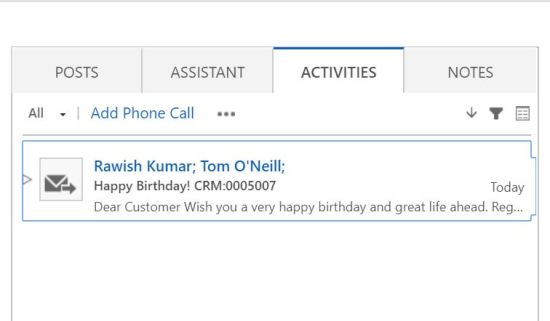
Few things :
- you can use an email template in the email request https://msdn.microsoft.com/en-us/library/gg334461.aspx
- All necessary log can be generated or logged to console.
I hope this helps!
 Passion Dynamics