Skip to primary content
Skip to secondary content

Passion Dynamics

Microsoft Power Platform & Azure blog by Rawish Kumar

Passion Dynamics

Main menu

  • Home
  • About Me
  • Contact

Tag Archives: manage feedback

Manage Feedback out of the box in Microsoft Dynamics crm

Posted on February 23, 2018 by Rawish Kumar Prajapati
Reply

This feature was introduced in CRM Online 2016 Update 1 and CRM 2016 Service Pack 1 (on-premises).

you can Improve your products and services by enabling users to provide feedback and ratings for entity records in Microsoft Dynamics 365. For example, you can enable feedbacks and ratings for the Product entity to know user’s feedback on the products you sell, or on the Incident (case) entity to understand and improve the quality of your customer support team.

You can enable feedback and rating for both system and custom entities in Dynamics 365.

The Feedback entity stores the following information :

  • Feedback title
  • Feedback comments
  • Feedback rating. You can also define a range for ratings by specifying a minimum and maximum (numerical) value for ratings. For example, a rating of 4 on the scale of 1-5.
  • Normalized rating for feedback that is automatically calculated to show the specified user rating scaled to a value between 0 and 1 based on the minimum and maximum rating values.
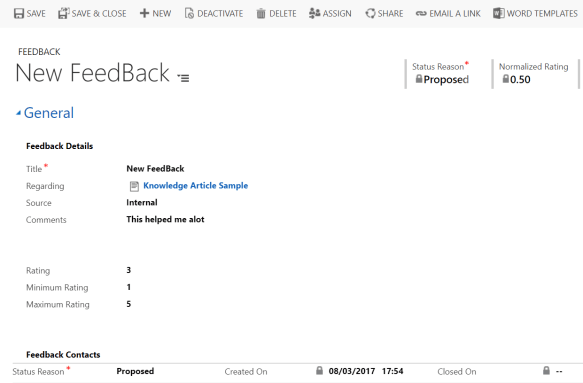
feedback


please refer to the below post on how to enabled it for your OOB and Custom entities:

https://technet.microsoft.com/library/mt826657.aspx


i hope this helps!

cheers!


Share this:

  • Share on X (Opens in new window) X
  • Share on Facebook (Opens in new window) Facebook
Like Loading...
Posted in Uncategorized | Tagged Author:Rawish, CRM, feedback in crm, feedback in mscrm, manage feedback, Manage Feedback out of the box in Microsoft Dynamics crm, manage microsoft dynamics crm feedback, Microsoft Dynamics CRM | Leave a reply
Follow Passion Dynamics on WordPress.com

I'm not an expert; I'm learning!

Top Posts & Pages

  • How to insert dynamic values from custom entities in an email template - Microsoft Dynamics CRM
  • Register Dynamics CRM App With Azure for OAuth 2.0 Authentication
  • Get Selected Record Information From Main View Or A Subgrid In Dynamics 365
  • About Me
  • An unsecured or incorrectly secured fault was received from the other party
  • Alternate Keys
  • Audit History
  • Business Rules
  • Calculated & Rollup Fields
  • Certifications
  • CRM Code Helpers
  • CRM WebApi/Javascript
  • Data Migration
  • Deployment
  • Dynamics 365 For Marketing
  • Dynamics CRM 365 Online
  • Dynamics Portal
  • Microsoft Dynamics CRM Emails
  • Microsoft Dynamics CRM Reporting
  • Microsoft Dynamics CRM SDK
  • Microsoft Dynamics CRM Services
  • Microsoft Dynamics CRM Solutions
  • Reblogged
  • Uncategorized
  • Unified Service Desk for Dynamics CRM
  • Voice Of Customer
  1. Galusz Marton's avatar
    Galusz Marton on Get User’s Teams Using WebApi JavaScript In Dynamics 365September 11, 2024

    For anyone still struggling to retrieve only the Teams that a specific user belongs to, you can filter the returned…

  2. CRM Web Service - Appstore on When To Use Which Microsoft Dynamics CRM Web ServiceMay 27, 2023

    […] source image:passion4dynamics […]

  3. Jessica's avatar
    Jessica on Search For Privilege Name Using Privilege IdMay 2, 2023

    Awesome! Thanks so much for this post!

  4. Alessandro's avatar
    Alessandro on Get Selected Record Information From Main View Or A Subgrid In Dynamics 365April 19, 2023

    Hi, do you know whether it works on Canvas App modals?

  5. Tamilselvan's avatar
    Tamilselvan on Dynamics 365 For Marketing – Retrieve Contacts From A SegmentDecember 23, 2022

    Ok, Got it... To access this schema information, Marketing app has to be installed. It was explained in the MS…

Create a website or blog at WordPress.com
  • Subscribe Subscribed
    • Passion Dynamics
    • Join 47 other subscribers
    • Already have a WordPress.com account? Log in now.
    • Passion Dynamics
    • Subscribe Subscribed
    • Sign up
    • Log in
    • Report this content
    • View site in Reader
    • Manage subscriptions
    • Collapse this bar
 

Loading Comments...
 

    %d