Skip to primary content
Skip to secondary content

Passion Dynamics

Microsoft Power Platform & Azure blog by Rawish Kumar

Passion Dynamics

Main menu

  • Home
  • About Me
  • Contact

Tag Archives: metadata contains a reference that cannot be resolved at

Microsoft Dynamics CRM 365 SDK tools issues

Posted on April 9, 2018 by Rawish Kumar Prajapati
Reply

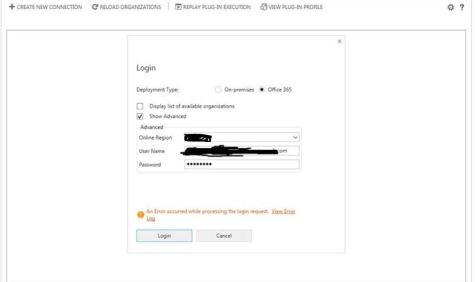
Lately Issues with connecting to dynamics CRM 365 online using Plugin Registration, Migration utitlity , package deployer tool etc have been faced by many. Below common issues are faced by people:

  1. metadata contains a reference that cannot be resolved at (……)
  2. once you login , it does connects to the org but nothing happens. no error.
  3. Internal server error.

Capture

the quick and easy resolution the above issues is to get the latest versions of all these tools from nuget manager by using powershell or visiting http://xrm.tools/ and not the one which is available under microsoft downloads.

Download tools using PowerShell

  1. In your Windows Start menu, type Windows Powershell and open it.
  2. Navigate to the folder you want to install the tools to. For example if you want to install them in a devtools folder on your D drive, type cd D:\devtools.
  3. Copy and paste the following PowerShell script into the PowerShell window and press Enter.
    $sourceNugetExe = "https://dist.nuget.org/win-x86-commandline/latest/nuget.exe"
    $targetNugetExe = ".\nuget.exe"
    Remove-Item .\Tools -Force -Recurse -ErrorAction Ignore
    Invoke-WebRequest $sourceNugetExe -OutFile $targetNugetExe
    Set-Alias nuget $targetNugetExe -Scope Global -Verbose
    
    ##
    ##Download Plugin Registration Tool
    ##
    ./nuget install Microsoft.CrmSdk.XrmTooling.PluginRegistrationTool -O .\Tools
    md .\Tools\PluginRegistration
    $prtFolder = Get-ChildItem ./Tools | Where-Object {$_.Name -match 'Microsoft.CrmSdk.XrmTooling.PluginRegistrationTool.'}
    move .\Tools\$prtFolder\tools\*.* .\Tools\PluginRegistration
    Remove-Item .\Tools\$prtFolder -Force -Recurse
    
    ##
    ##Download CoreTools
    ##
    ./nuget install Microsoft.CrmSdk.CoreTools -O .\Tools
    md .\Tools\CoreTools
    $coreToolsFolder = Get-ChildItem ./Tools | Where-Object {$_.Name -match 'Microsoft.CrmSdk.CoreTools.'}
    move .\Tools\$coreToolsFolder\content\bin\coretools\*.* .\Tools\CoreTools
    Remove-Item .\Tools\$coreToolsFolder -Force -Recurse
    
    ##
    ##Download Configuration Migration
    ##
    ./nuget install Microsoft.CrmSdk.XrmTooling.ConfigurationMigration.Wpf -O .\Tools
    md .\Tools\ConfigurationMigration
    $configMigFolder = Get-ChildItem ./Tools | Where-Object {$_.Name -match 'Microsoft.CrmSdk.XrmTooling.ConfigurationMigration.Wpf.'}
    move .\Tools\$configMigFolder\tools\*.* .\Tools\ConfigurationMigration
    Remove-Item .\Tools\$configMigFolder -Force -Recurse
    
    ##
    ##Download Package Deployer 
    ##
    ./nuget install Microsoft.CrmSdk.XrmTooling.PackageDeployment.WPF -O .\Tools
    md .\Tools\PackageDeployment
    $pdFolder = Get-ChildItem ./Tools | Where-Object {$_.Name -match 'Microsoft.CrmSdk.XrmTooling.PackageDeployment.Wpf.'}
    move .\Tools\$pdFolder\tools\*.* .\Tools\PackageDeployment
    Remove-Item .\Tools\$pdFolder -Force -Recurse
    
    ##
    ##Remove NuGet.exe
    ##
    Remove-Item nuget.exe
  1. You will find the tools in the following folders:
  • [Your folder]\Tools\ConfigurationMigration
  • [Your folder]\Tools\CoreTools
  • [Your folder]\Tools\PackageDeployment
  • [Your folder]\Tools\PluginRegistration

i hope this helps!

Share this:

  • Share on X (Opens in new window) X
  • Share on Facebook (Opens in new window) Facebook
Like Loading...
Posted in Dynamics CRM 365 Online | Tagged Author:Rawish, Internal server error, metadata contains a reference that cannot be resolved at, Microsoft Dynamics CRM, Microsoft Dynamics CRM 365 SDK tools issues, not able to connect to dynamics crm online using plugin registration tool | Leave a reply
Follow Passion Dynamics on WordPress.com

I'm not an expert; I'm learning!

Top Posts & Pages

  • How to insert dynamic values from custom entities in an email template - Microsoft Dynamics CRM
  • Register Dynamics CRM App With Azure for OAuth 2.0 Authentication
  • Get Selected Record Information From Main View Or A Subgrid In Dynamics 365
  • About Me
  • An unsecured or incorrectly secured fault was received from the other party
  • Alternate Keys
  • Audit History
  • Business Rules
  • Calculated & Rollup Fields
  • Certifications
  • CRM Code Helpers
  • CRM WebApi/Javascript
  • Data Migration
  • Deployment
  • Dynamics 365 For Marketing
  • Dynamics CRM 365 Online
  • Dynamics Portal
  • Microsoft Dynamics CRM Emails
  • Microsoft Dynamics CRM Reporting
  • Microsoft Dynamics CRM SDK
  • Microsoft Dynamics CRM Services
  • Microsoft Dynamics CRM Solutions
  • Reblogged
  • Uncategorized
  • Unified Service Desk for Dynamics CRM
  • Voice Of Customer
  1. Galusz Marton's avatar
    Galusz Marton on Get User’s Teams Using WebApi JavaScript In Dynamics 365September 11, 2024

    For anyone still struggling to retrieve only the Teams that a specific user belongs to, you can filter the returned…

  2. CRM Web Service - Appstore on When To Use Which Microsoft Dynamics CRM Web ServiceMay 27, 2023

    […] source image:passion4dynamics […]

  3. Jessica's avatar
    Jessica on Search For Privilege Name Using Privilege IdMay 2, 2023

    Awesome! Thanks so much for this post!

  4. Alessandro's avatar
    Alessandro on Get Selected Record Information From Main View Or A Subgrid In Dynamics 365April 19, 2023

    Hi, do you know whether it works on Canvas App modals?

  5. Tamilselvan's avatar
    Tamilselvan on Dynamics 365 For Marketing – Retrieve Contacts From A SegmentDecember 23, 2022

    Ok, Got it... To access this schema information, Marketing app has to be installed. It was explained in the MS…

Create a website or blog at WordPress.com
  • Subscribe Subscribed
    • Passion Dynamics
    • Join 47 other subscribers
    • Already have a WordPress.com account? Log in now.
    • Passion Dynamics
    • Subscribe Subscribed
    • Sign up
    • Log in
    • Report this content
    • View site in Reader
    • Manage subscriptions
    • Collapse this bar
 

Loading Comments...
 

    %d