
Description:
Sometimes we have a requirement to retrieve audit history changes for a particular field in CRM which may be for the purpose of checking if for e.g field A value which is at the moment set to “10”, was ever “5” or may be “3” or may be use old those values of fields to create a new CRM Record. In the below Image , you can easily retrieve old and new values at any given time on birthday field by looping on each audit record:
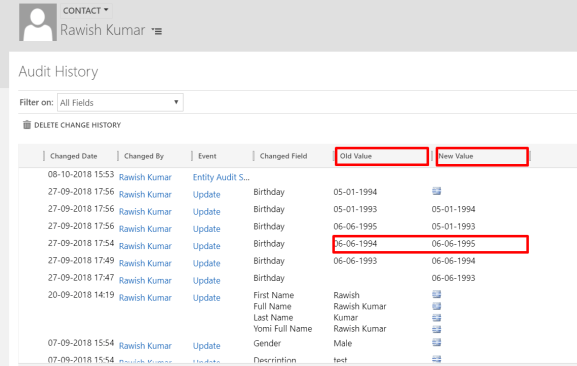
I have taken the reference from Dynamics CRM SDK & MSDN to figure out how this can be achieved.
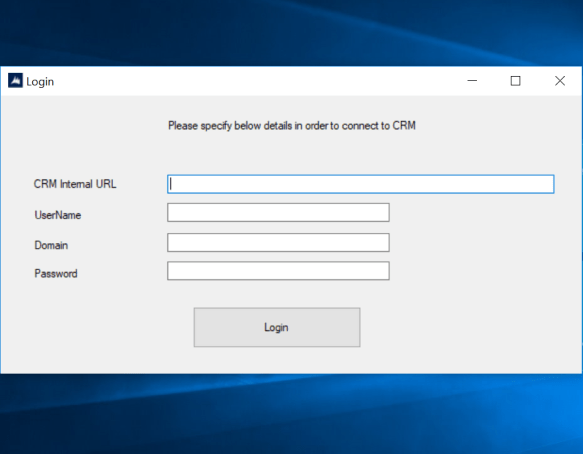
Please note : To be able to use this you must have Auditing enabled on all three areas of CRM.
1. Auditing for whole Organization should be already turned on.
2. Auditing for Entity Should be already turned on.
3. Auditing for that Field should already be turned on.
Solution Code:
I have accomplished this on a console application , you can do it in plugins or custom workflows as per the requirement.
Required :
Namespace: Microsoft.Crm.Sdk.Messages
Assembly: Microsoft.Crm.Sdk.Proxy (in Microsoft.Crm.Sdk.Proxy.dll)
try
   {
//initiate a new retrieve request & add entity logical name + Guid of the record to retrieve
    RetrieveRecordChangeHistoryRequest changeRequest = new RetrieveRecordChangeHistoryRequest();
    changeRequest.Target = new EntityReference("contact", Id);                RetrieveRecordChangeHistoryResponse changeResponse =

//Execute the request, the "details" variable will have the audit data.
    (RetrieveRecordChangeHistoryResponse)_service.Execute(changeRequest);
    AuditDetailCollection details = changeResponse.AuditDetailCollection;

// Retrieve Particular attribute change history by passing entity logical
//name and guid of the record, finally execute using RetrieveRecordChangeHistoryResponse
    var attributeChangeHistoryRequest = new RetrieveAttributeChangeHistoryRequest
      {
           Target = new EntityReference("contact", Id),
           AttributeLogicalName = "birthday"

       };

     var attributeChangeHistoryResponse = (RetrieveAttributeChangeHistoryResponse)_service.Execute(attributeChangeHistoryRequest);
     details = attributeChangeHistoryResponse.AuditDetailCollection;

//Details will have many records for example birthday change records, loop through all of them
       foreach (var detail in details.AuditDetails)
         {
             var detailType = detail.GetType();
             if (detailType == typeof(AttributeAuditDetail))
                  {
// retrieve old & new value of each action of each audit change from AttributeAuditDetail
                var attributeDetail = (AttributeAuditDetail)detail;
                foreach (KeyValuePair<string, object> attribute in attributeDetail.NewValue.Attributes)

                        {

                        string oldValue = "(no value)", newValue = "(no value)";
                        if (attributeDetail.OldValue.Contains(attribute.Key))

                       oldValue = attributeDetail.OldValue[attribute.Key].ToString();
                       newValue = attributeDetail.NewValue[attribute.Key].ToString();

                       if (oldValue !=null & newValue!=null)
                            {
                             // Do Something here!
                            }
                        }
                    }
                }
            }
            catch (Exception ex)
            {
                throw new Exception(ex.Message);
}
I hope this helps!
 Give the appropriator name , select data type as Currency or as per your need > Select Field type as Calculated and click on Edit. As soon as you click on edit, system will actually create this field for you.
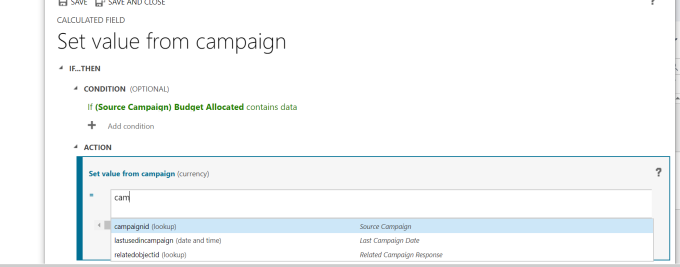

 Save and close the editor and also the field property window.
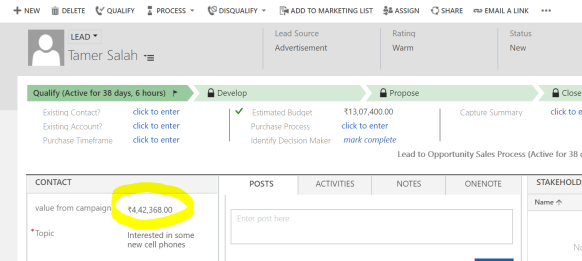 campaign :
 It is a very basic example i showed , i tried not to make it complex as it might become very confusing for a beginner. You can do a lot manipulation with the data by using out of the box functions that are available for a calculated field or apply your custom logic.hope this helps!
 Passion Dynamics