Skip to primary content
Skip to secondary content

Passion Dynamics

Microsoft Power Platform & Azure blog by Rawish Kumar

Passion Dynamics

Main menu

  • Home
  • About Me
  • Contact

Tag Archives: someone deleted the AD account of the user

The selected object could not be found. verify that the object exists in both the database and Active Directory

Posted on May 15, 2018 by Rawish Kumar Prajapati
1

Recently while enabling a user in my Dynamics CRM 2016 OnPremise I got below error :
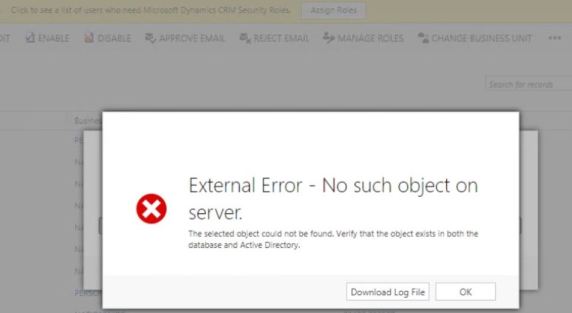
Capture

Root Cause:

The error clearly tells me that there is definitely something wrong with the user setup on Active Directory. After digging in further this is what i understood as what exactly might happened with this user :

  1. User was added to AD
  2. User was added to CRM
  3. User was disabled in CRM
  4. User was deleted from AD
  5. User was again created in AD


Conclusion:

Now in CRM whenever you create a user (applicable to AD authentication) it stored an object GUID of the AD account with the database column as ActiveDirectoryGuid in systemuser table.

final Conlusision : so now when you try to enable the user again – CRM try to get this object GUID from AD but it will not find it, hence will give you this error.


Solutions:

  1.  Get the new GUID from Active directory and update it in CRM database[ systemuserbase table and ActiveDirectoryGuid column] – Have not tried it personally. 
  2. Create a new user account in CRM for this user – it will allow you since there would be no GUID conflicting. [you might get error as duplicate record exist – you can try to put some addition middle name of character in the full name ]


What I did:

i have in this scenario used the second approach as the user was fairly new and there was not much dependency with the record.

However if a user very old and have a lot records in CRM – you will have no choice but to go for the first step.


Hope this helps!

Cheers!

Share this:

  • Share on X (Opens in new window) X
  • Share on Facebook (Opens in new window) Facebook
Like Loading...
Posted in Uncategorized | Tagged Author:Rawish, CRM, External Error - No such object on server + crm, how to fix if an AD account has been delete, issue while enabling the CRM user, Microsoft Dynamics CRM, someone deleted the AD account of the user, The selected object could not be found. verify that the object exists in both the database and Active Directory, The selected object could not be found. verify that the object exists in both the database and Active Directory + crm | 1 Reply
Follow Passion Dynamics on WordPress.com

I'm not an expert; I'm learning!

Top Posts & Pages

  • How to insert dynamic values from custom entities in an email template - Microsoft Dynamics CRM
  • An unsecured or incorrectly secured fault was received from the other party
  • A bit About "Post" In Dynamics 365 CE
  • Create Auto-Number Attribute In Dynamics CRM 365 Using Organization Service + Simple Console Application
  • Register Dynamics CRM App With Azure for OAuth 2.0 Authentication
  • Alternate Keys
  • Audit History
  • Business Rules
  • Calculated & Rollup Fields
  • Certifications
  • CRM Code Helpers
  • CRM WebApi/Javascript
  • Data Migration
  • Deployment
  • Dynamics 365 For Marketing
  • Dynamics CRM 365 Online
  • Dynamics Portal
  • Microsoft Dynamics CRM Emails
  • Microsoft Dynamics CRM Reporting
  • Microsoft Dynamics CRM SDK
  • Microsoft Dynamics CRM Services
  • Microsoft Dynamics CRM Solutions
  • Reblogged
  • Uncategorized
  • Unified Service Desk for Dynamics CRM
  • Voice Of Customer
  1. Galusz Marton's avatar
    Galusz Marton on Get User’s Teams Using WebApi JavaScript In Dynamics 365September 11, 2024

    For anyone still struggling to retrieve only the Teams that a specific user belongs to, you can filter the returned…

  2. CRM Web Service - Appstore on When To Use Which Microsoft Dynamics CRM Web ServiceMay 27, 2023

    […] source image:passion4dynamics […]

  3. Jessica's avatar
    Jessica on Search For Privilege Name Using Privilege IdMay 2, 2023

    Awesome! Thanks so much for this post!

  4. Alessandro's avatar
    Alessandro on Get Selected Record Information From Main View Or A Subgrid In Dynamics 365April 19, 2023

    Hi, do you know whether it works on Canvas App modals?

  5. Tamilselvan's avatar
    Tamilselvan on Dynamics 365 For Marketing – Retrieve Contacts From A SegmentDecember 23, 2022

    Ok, Got it... To access this schema information, Marketing app has to be installed. It was explained in the MS…

Create a website or blog at WordPress.com
  • Subscribe Subscribed
    • Passion Dynamics
    • Join 47 other subscribers
    • Already have a WordPress.com account? Log in now.
    • Passion Dynamics
    • Subscribe Subscribed
    • Sign up
    • Log in
    • Report this content
    • View site in Reader
    • Manage subscriptions
    • Collapse this bar
 

Loading Comments...
 

    %d