———- is not a valid status code for state code entity

Often you see this error in your plugin or Webapi actions when you trying to play with the status and status reasons in microsoft dyamics crm.

so, lets understand this.

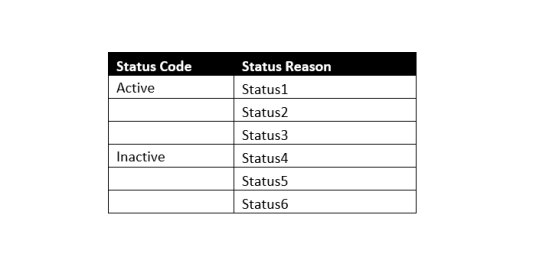
Suppose i have below status and status reasons:

status

as you can see there is a set of status reason you can only combine with and “Active” Statecode and some with “Inactive” statecode.

So ,if you have a status reason which belongs to an active statecode but you use it with an inactive statecode and vice versa, you will be presented with this error.

and in the error first line you can actually see what optionset value it is talking about.

i hope this helps.

Cheers!

How to enable Image for an entity in Microsoft Dynamics CRM

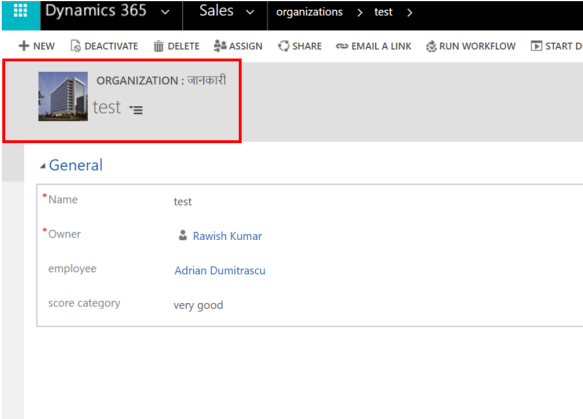
In this blog i am going to discuss about “Image” type attribute/field in CRM and how this can be used to enable image for an entity on the form like below:

8


Lets see how we can achieve this:

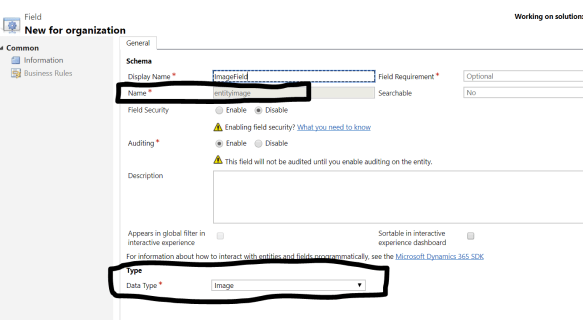
  1. Navigate to Customization>Customize the system>Entities & navigate to the entity for which you want to enable image> go to fields > create a new field as below:2
    Give it a name and select Datatype as image – as soon as you select datatype , you will notice that Schema of the field is set to “entityimage”. Save & close
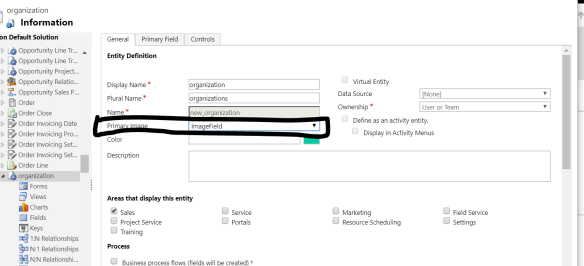
  2. Now 2nd step is to navigate to entity definition as below:3In the property ” Primary Image” – you will see the name has come , if not select it from the dropdown.
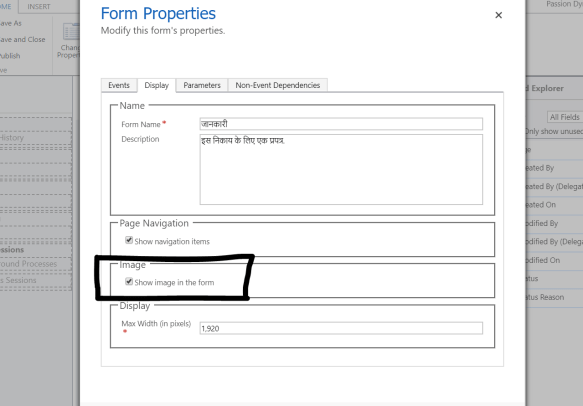
  3. Final Step is to make form changes, navigate to the form and open form editor and click on “form properties” , select the below option:4
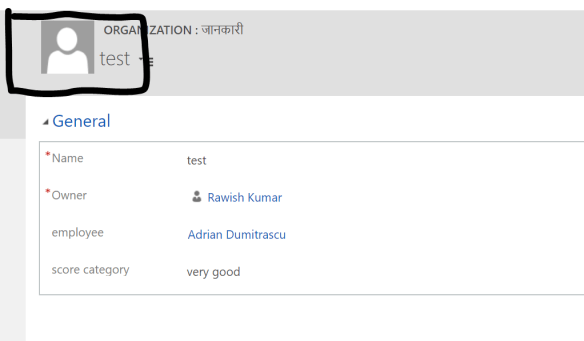
  4. Lastly save and close the form and publish all customizations. Navigate to the entity record , you will notice an image icon is now appearing on the form.
    5
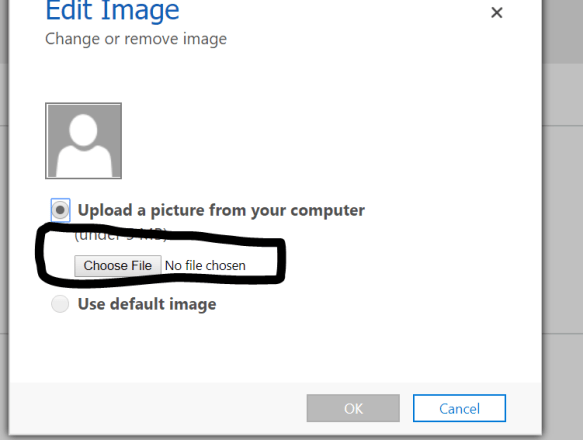
  5. click on the image and browse the image you want to set:6
  6. After Selecting the Image click okay and you will see image is appearing now:7


I hope this helps!


cheers!

Difference between Articles, Knowledge Articles & Knowledge Base Record in Microsoft Dynamics CRM

I had so much confusion around these three terms in Dynamics CRM until i didnt actually paid my full attention to them and understood which one is what and where to use them.

  1. Article(kbarticle)
  2. Knowledge Article(knowledgearticle)
  3. Knowledge Base Record(knowledgebaserecord)

Let’s understand one by one briefly

1.Article

Articles are actually an old version of knowledge articles in crm. Currently you will see both are present and can be used as per requirement or as you need them. Knowledge Articles have advanced functionality.

for e.g Engagement hub will use your knowledge article entity and you work on them in engagement hub. Articles are specific to Dynamics CRM.

Knowledge article has functionality like versioning and translation. Apart from these functionality remains the same like creating , reviewing , approving and using them.

for more details you can visit below post : https://msdn.microsoft.com/en-us/library/gg309345.aspx#EarlierKBArticle


2.Knowledge Article

As I Mention above, knowledge article is the latest feature in CRM and has rich functionality above the legacy articles.

you can create minor and major versions of article which can be crucial and important if you have an organization where lot of changes and upgrade happens.

Apart from it you can can create knowledge article translation and can be in more than 150 languages. To understand a knowledge article life cycle and other things , see below post :

https://msdn.microsoft.com/en-us/library/gg309345.aspx


3.Knowledge Base

The knowledge base record entity represents a record containing the metadata of a knowledge base record in Parature.  It is used specifically for parature integration.

Parature is a cloud-based customer engagement solution which Microsoft acquired in 2014.  Enterprises can deploy Parature to provide self-service capabilities to their customers.

Know more about it :  https://msdn.microsoft.com/en-au/library/dn996872.aspx


I hope this helps!

Cheers!


RIP SDK – Dynamics CRM 365 v9

As per the recent communication from Microsoft, Microsoft Dynamics CRM SDK will not be available on Microsoft downloads. If you are working on Dynamics 365 v9, well you have to download every component which was available in the SDK individually.

Every tool will be available via NuGet Manager.

The name will be : Developer Guide not Dynamics CRM SDK.

For more information, visit the below blog :  https://blogs.msdn.microsoft.com/crm/2017/11/01/whats-new-for-customer-engagement-developer-documentation-in-version-9-0

Here is the step by step information on how to download these tools using powershell :  https://docs.microsoft.com/en-us/dynamics365/customer-engagement/developer/download-tools-nuget


i hope this helps.

Cheers!


How to set PartyList in Microsoft Dynamics CRM using Javascript

Let make it a smallest blog possible.

below code i have been using without any issue when it comes to setting a partylist or multi lookup in CRM. In the below code i am retrieving the contact id or the id of entity which is there in the regarding field & setting it on the “From” field.

function setCallFrom() 
{
 var lookup = new Array();
 lookup = Xrm.Page.getAttribute("regardingobjectid").getValue();
 if (lookup != null) {
 var name = lookup[0].name;
 var id = lookup[0].id;
 var entityType = lookup[0].entityType;
 if (entityType == "contact") {

var value = new Array();
 value[0] = new Object();
 value[0].id = id;
 value[0].name = name;
 value[0].entityType = "contact";

Xrm.Page.getAttribute("from").setValue(value);
 }

}
}

With slight modifications you can use the code on any other activity if you need to set partylist.

Call this function on Onload of the record or on onchange of the regarding field.

hope this helps!

Cheers!

Color Subgrid in Microsoft Dynamics CRM 365

Microsoft dynamics CRM is definitely turning colorful and interesting(has been always to me but in terms of look and feel). Recently subgrid’s in CRM have taken a full swing be in terms of editing them or looking colorful.

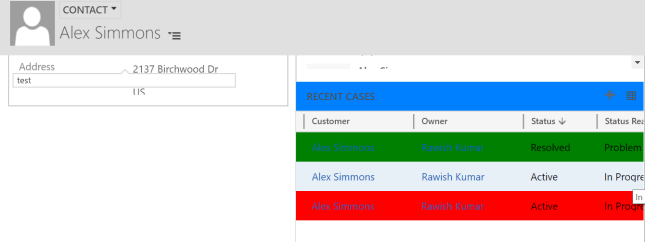
I tried something with my dynamics crm 365 trial and this is how it looks :

color

Now if i talk about above picture – it is actually a combination of Out of the box feature and UNSUPPORTED feature.

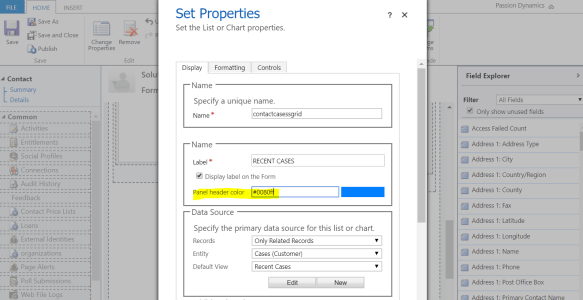
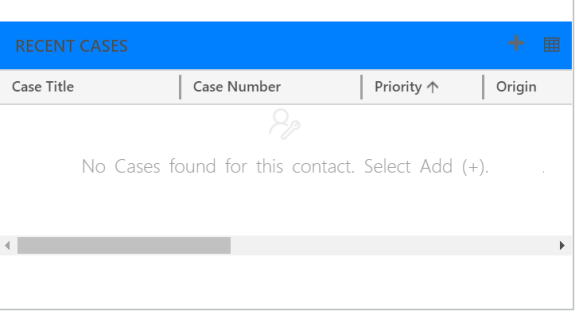
  1. The header of the subgrid can be configured to use any color by clicking on subgrid properties from form editor like below:color2.PNGto make the most of out of this color option you need to know the exact hexa/html code of the color, i used this website to get the code : http://htmlcolorcodes.com/colo3
  2. For the second feature i have actually used unsupported javascript below :
    function subGridOnload()
    {
    var grid = $('#contactcasessgrid'); //Replace Grid name here
    if (grid == null)
    {                            // delay one second and try again.
    setTimeout(subGridOnload, 1000);
    return;
    }
    if(grid[0] == undefined)
    {
    // delay one second and try again.
    setTimeout(subGridOnload, 1000);
    return;
    }
    if(grid[0].control == undefined)
    {
    // delay one second and try again.
    setTimeout(subGridOnload, 1000);
    return;
    }
    if(grid[0].control == null)
    {
    // delay one second and try again.
    setTimeout(subGridOnload, 1000);
    return;
    }
    if (grid[0].control.get_totalRecordCount() == -1)
    {
    // delay one second and try again.
    setTimeout(subGridOnload, 1000);
    return;
    }
    
    // logic Replace status names and colours as required
    
    $('#contactcasessgrid td').filter(function() {
    return $(this).text() == 'Resolved';
    }).closest('tr').css('background-color', 'Green');
    $('#contactcasessgrid td').filter(function() {
    return $(this).text() == 'Active';
    }).closest('tr').css('background-color', 'Red');
    }


    As seen in the above code , i am assigning Green color to Resolved cases and Red color to Active cases on the subgrid.

    you can read any value in the subgrid and apply any color to it.

    hope this helps.

    cheers!

Show entity form based on a field value in Microsoft Dynamics CRM

Having multiple forms for an entity is definitely amazing since you can control visibility of fields without having to write business rule or Javascript to hide hundreds of fields based on some value.

Now out of the box you can control CRM forms visibility/preference using security roles. However it is not you would always want to to do; sometimes you might have to control form preferences based on field value.

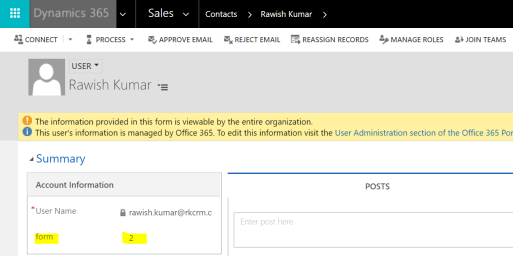
here is the sample code that i am using – on load of create/update/all forms i am retrieving a value from owner of that record – since on creation only owner gets filled up.  I have create a field “new_form” as a whole number on system user :
1

i have currently have it a value as “2”. lets see how i am going to retrieve this value in my code and set the correct form :

//do a webapi action to retrieve the form value from systemuser.

var formnewvalue = ' ';
function retrieveFromValue() {
 debugger;
 var userid = Xrm.Page.getAttribute("ownerid").getValue();
 var newid = userid[0].id.slice(1, -1);
 var req = new XMLHttpRequest();
 req.open("GET", Xrm.Page.context.getClientUrl() + "/api/data/v8.2/systemusers(" + newid + ")?$select=new_form", true);
 req.setRequestHeader("OData-MaxVersion", "4.0");
 req.setRequestHeader("OData-Version", "4.0");
 req.setRequestHeader("Accept", "application/json");
 req.setRequestHeader("Content-Type", "application/json; charset=utf-8");
 req.setRequestHeader("Prefer", "odata.include-annotations=\"*\"");
 req.onreadystatechange = function () {
 if (this.readyState === 4) {
 req.onreadystatechange = null;
 if (this.status === 200) {
 var result = JSON.parse(this.response);
 var new_form = result["new_form"];
 var new_form_formatted = result["new_form@OData.Community.Display.V1.FormattedValue"];
formnewvalue = new_form_formatted;

 showForm();

 } else {
 Xrm.Utility.alertDialog(this.statusText);
}
 }
 };
 req.send();
}
function showForm() {
 debugger;
var lblForm;
var relType = formnewvalue

switch (relType) {
case "1":
lblForm = "Portal Contact";
break;

case "2":
lblForm = "Profile Web Form";
break;

default:
lblForm = "Contact";

}
 //check if the current form is form need to be displayed based on the value
 if (Xrm.Page.ui.formSelector.getCurrentItem().getLabel() != lblForm) {
 var items = Xrm.Page.ui.formSelector.items.get();
 for (var i in items) {
 var item = items[i];
 var itemId = item.getId();
 var itemLabel = item.getLabel()
 if (itemLabel == lblForm) {
 //navigate to the form
 item.navigate();
 } 
 } 
 }
}

if you notice my switch statement you will see i m assigning the name of the forms to the values that i will be setting on the user profile.

Once it gets the form name – it than runs through all the forms for this entity untill it fins the correct form and then navigates to it.

i would say this script is majorly needed for first time or for a new system – since Internet Explorer or Chrome keep the form preference , so once our code the job and opened the required form -next time even if we remove the script -it will opening that form.

Another good is – this script prevents user to switch to other form as whenever  a user try to switch the form – on load event triggers and again check the value from owner id and change it back to the required one.

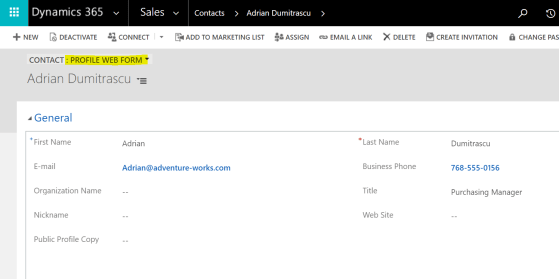
so since i have assigned value “2” to my user i should see “Profile Web Form” , lets see if this works :
2.jpg

woo , it did work.

point to note is you will have to attach this script to all the forms in the entity and call the function on onload for all forms.

hope this helps!

cheers!

Learn Microsoft Dynamics CRM – Basics, Customization & Configuration

aads-education-offers-microsoft-dynamics-crm-training-2-638

In office, while i am blogging or in dynamics community ; i always get this question that how a fresher can start learning CRM. Well let me tell you learning CRM is very easy since it is a Microsoft technology in which we have been living & using from our outlook to windows.

Well on internet ; information is pretty much distributed and in bits & pieces but i have collected the below information in sequence on how you  can you start from zero and go till 100 🙂

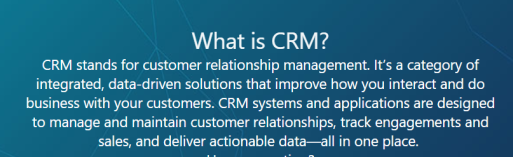
  1. First things first you should know what is CRM , well according to microsoft definition is :
             crm definition.PNG

    “CRM solutions streamline processes and increase profitability in your sales, marketing, and service divisions. A strong CRM solution is a multifaceted platform where everything crucial to developing, improving, and retaining your customer relationships is stored. Without the support of an integrated CRM solution, you may miss growth opportunities and lose revenue because you’re not maximizing your business relationships.”

  2. Next i would suggest you to see above everything in action :  https://www.chalkstreet.com/microsoft-dynamics-crm-tutorial    ,  https://mva.microsoft.com/en-us/training-courses/introduction-to-microsoft-dynamics-365-17593?l=J6OdOYtqD_906312570
  3. Once you have done this – i think you will be pretty much comfortable having your own CRM environment to get your hands dirty in, therefore go ahead and get your trial :https://trials.dynamics.com/
  4. Time to know how CRM can be available to you(to be technical “deployment options available in CRM”) :  https://www.powerobjects.com/2015/10/21/upgrading-crm-crm-online-vs-on-premises-finding-the-best-fit-for-your-organization/
  5. Once you understood all above, my suggestion for you is to now understand the core concepts which makes the whole CRM :

https://www.tutorialspoint.com/microsoft_crm/microsoft_crm_overview.htm

In this tutorial you will learn about what are the core components of  CRM like Entities , Fields, Forms, Business process flows etc. This blog also pretty much explains how you can customize the crm.

6. Now go though this blog and do same in your trial version :

https://crmbook.powerobjects.com/system-administration/customization/

i will talk about customizing, fields, forms , entities , charts, dashboards,solutions etc.

7. Security model – Now this is a major topic which you must understand very well without which it will be very difficult for you to master dynamics crm else you will be missing out on very small/minor things during your career

https://www.youtube.com/watch?v=_vfp3C11a3Mhttps://www.youtube.com/watch?v=An-VgsHEp9A

8. Now , one of the main features of crm is “Processes” , processes are the main component in CRM which helps you to perform actions based on your needs :

a. business rules :  http://www.inogic.com/blog/2016/12/business-rules-dynamics-365/

b. Workflows :  https://crmbook.powerobjects.com/system-administration/processes/workflows/

c.Plugins :  https://crmbook.powerobjects.com/extending-crm/plug-in-development-and-workflow-extensions/plug-ins/developing-a-plug-in/

9.Apart from it most of the stuff you would do through JavaScript which you coudnt  using business rule, mainly javascript is used to perform complex logics else i always recommend you to use business rules  :  https://www.youtube.com/watch?v=wxMB-cIQPUw


if you go through all of the above carefully , you will be in a position to work on dynamics crm confidently.

Please leave your comment if i have missed out anything major or you have any question, need guidance on any of the topics above.

happy crm learning, cheers!

Lock all fields on a form using Javascript- Microsoft Dynamics CRM

Hi Guys,

We all get requirements to lock the whole form to stop people from editing the record.

There are some out of the box options available to achieve this :

  1. Create a business rule : you can easily create a business and use lock field feature however you will have to select all the field on the form one by one – for .e.g if you have 50 fields on the form, you will have to add action for all of them. Moreover another limitation is if a field is removed from the form – you business rule will stop working.
  2. We all know if record is status is set to inactive – form become uneditable but in this scenarios we want to keep the record but uneditable.

Therefore, we come down to our final easy solution to tackle all problems above, the Javascript. Have a look on the below code :

 function disableFormFields()

{

       Xrm.Page.ui.controls.forEach(function (control, index) {

           var controlType = control.getControlType();

           if (controlType != “iframe” && controlType != “webresource” && controlType != “subgrid”)

           {

               control.setDisabled(true);

           }

       });

}

above code takes the control of the form directly rather then of each field & locks all of them. Just call the function on Onload , I have used this on my form and it looks like below:

lockfield


Now you can definitely add your own logic into this code for .e.g you put a if condition to check some value based on which you want to lock all fields and another things if you need to leave some fields unlocked you can again you a if condition , check the value and use below

just add the below code to above code :

if (crmfield = abc)

{

Xrm.Page.ui.controls.get(“CrmFieldShcemaname1”).setDisabled(false);

Xrm.Page.ui.controls.get(“CrmFieldShcemaNam2”).setDisabled(false);

Xrm.Page.ui.controls.get(“CrmFieldShcemaNam2”).setDisabled(false);

}


hope this helps you!

cheers