
Hi folks , i have gathered a quick summary of important differences between a calculate field and a roll up field:
| Calculated Field | Roll Up Field |
| Data is calculated as soon as form is loaded | The rollups are calculated by scheduled system jobs that run asynchronously in the background. |
| calculated fields let you automate manual calculations used in your business processes. | . A rollup field contains an aggregate value computed over the records related to a specified record |
| The calculated fields comprise of calculations that use the fields from the current entity or related parent entities. | The roll up fields comprise of Aggregation that use the fields from the current entity or related child entities. |
| The expression support is available on the current entity and the related parent entity fields in the Condition sections and the Action sections. The built-in functions include:
ADDHOURS, ADDDAYS, ADDWEEKS, ADDMONTHS, ADDYEARS, SUBTRACTHOURS, SUBTRACTDAYS, SUBTRACTWEEKS, SUBTRACTMONTHS, SUBTRACTYEARS, DIFFINDAYS, DIFFINHOURS, DIFFINMINUTES, DIFFINMONTHS, DIFFINWEEKS, DIFFINYEARS, CONCAT, TRIMLEFT, and TRIMRIGHT. |
Wide selection of aggregate functions. You can aggregate data by using the following functions: SUM, COUNT, MIN, MAXand AVG. |
| A seamless integration of the calculated fields with the forms, views, charts, and reports is available in real time. | eamless integration with the user interface. You can include the rollup fields in forms, views, charts and reports. |
| The available data types for the calculated field: Single line of text,Option Set,Two Options,Whole Number,Decimal Number,Currency,Date and Time |
The data types include decimal or whole numbers, currency, and date/time. |
Above data has been collected from Microsoft technet.
if you wish to know more about these fields in-depth, please follow below:
Calculated Field : https://technet.microsoft.com/en-us/library/dn832103.aspx
Rollup Field : https://technet.microsoft.com/en-us/library/dn832162.aspx
Hope this helps!
Cheers!
 Give the appropriator name , select data type as Currency or as per your need > Select Field type as Calculated and click on Edit. As soon as you click on edit, system will actually create this field for you.
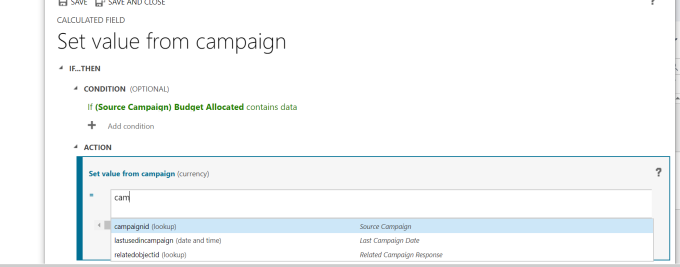

 Save and close the editor and also the field property window.
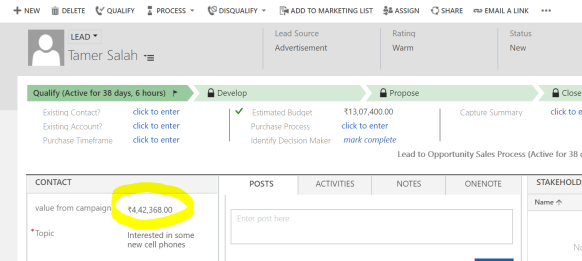 campaign :
 It is a very basic example i showed , i tried not to make it complex as it might become very confusing for a beginner. You can do a lot manipulation with the data by using out of the box functions that are available for a calculated field or apply your custom logic.hope this helps!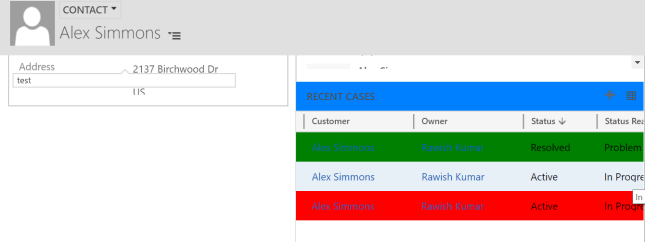
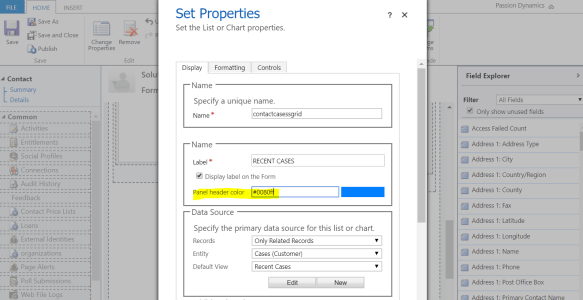 to make the most of out of this color option you need to know the exact hexa/html code of the color, i used this website to get the code : http://htmlcolorcodes.com/


 Passion Dynamics