Retrieve Audit History Changes For A Particular Field/Attribute Of A Record

Description:

Sometimes we have a requirement to retrieve audit history changes for a particular field in CRM which may be for the purpose of checking if for e.g field A value which is at the moment set to “10”, was ever “5” or may be “3” or may be use old those values of fields to create a new CRM Record. In the below Image , you can easily retrieve old and new values at any given time on birthday field by looping on each audit record:
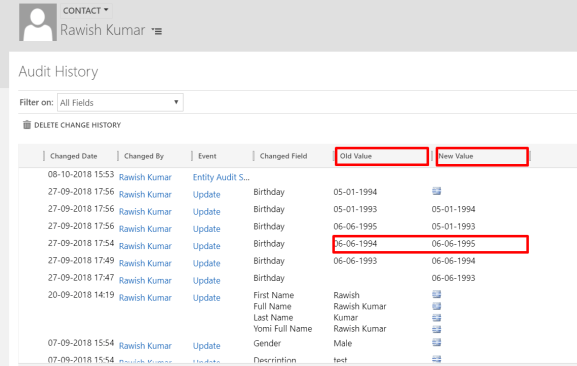
audit1

I have taken the reference from Dynamics CRM SDK & MSDN to figure out how this can be achieved.

Please note : To be able to use this you must have Auditing enabled on all three areas of CRM.

1. Auditing for whole Organization should be already turned on.

2. Auditing for Entity Should be already turned on.

3. Auditing for that Field should already be turned on.

Solution Code:

I have accomplished this on a console application , you can do it in plugins or custom workflows as per the requirement.

Required :

Namespace:   Microsoft.Crm.Sdk.Messages

Assembly:  Microsoft.Crm.Sdk.Proxy (in Microsoft.Crm.Sdk.Proxy.dll)

try
   {
//initiate a new retrieve request & add entity logical name + Guid of the record to retrieve
    RetrieveRecordChangeHistoryRequest changeRequest = new RetrieveRecordChangeHistoryRequest();
    changeRequest.Target = new EntityReference("contact", Id);                RetrieveRecordChangeHistoryResponse changeResponse =

//Execute the request, the "details" variable will have the audit data. 
    (RetrieveRecordChangeHistoryResponse)_service.Execute(changeRequest);
    AuditDetailCollection details = changeResponse.AuditDetailCollection;

// Retrieve Particular attribute change history by passing entity logical
//name and guid of the record, finally execute using RetrieveRecordChangeHistoryResponse
    var attributeChangeHistoryRequest = new RetrieveAttributeChangeHistoryRequest
      {
           Target = new EntityReference("contact", Id),
           AttributeLogicalName = "birthday"

       };

     var attributeChangeHistoryResponse = (RetrieveAttributeChangeHistoryResponse)_service.Execute(attributeChangeHistoryRequest);
     details = attributeChangeHistoryResponse.AuditDetailCollection;

//Details will have many records for example birthday change records, loop through all of them
       foreach (var detail in details.AuditDetails)
         {
             var detailType = detail.GetType();
             if (detailType == typeof(AttributeAuditDetail))
                  {
// retrieve old & new value of each action of each audit change from AttributeAuditDetail
                var attributeDetail = (AttributeAuditDetail)detail;
                foreach (KeyValuePair<string, object> attribute in attributeDetail.NewValue.Attributes)

                        {

                        string oldValue = "(no value)", newValue = "(no value)";
                        if (attributeDetail.OldValue.Contains(attribute.Key))

                       oldValue = attributeDetail.OldValue[attribute.Key].ToString();
                       newValue = attributeDetail.NewValue[attribute.Key].ToString();

                       if (oldValue !=null & newValue!=null)
                            {
                             // Do Something here!
                            }
                        }
                    }
                }
            }
            catch (Exception ex)
            {
                throw new Exception(ex.Message);
}

I hope this helps!
Solution Import Error 0x80044150 – Object reference not set to an instance of an object.

Issue:

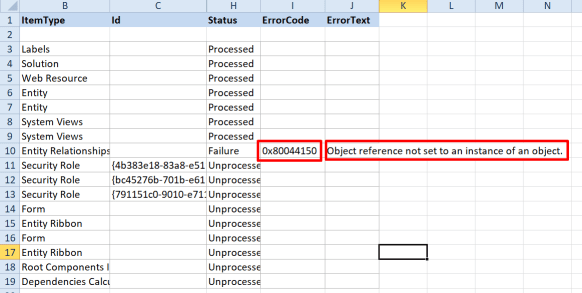
While importing a solution I got a generic SQL error but when i downloaded the log file i saw below error:

import error1

0x80044150 – Object reference not set to an instance of an object 

I have seen this error in plugins several times but never in import but root cause and underlying issue remains the same.

The import was trying to find something which was not there in target.

Solution

There was a relationship in my solution exist as N:1 to an entity which was deleted from target system way back hence this error occurred. Using the relationship given in solution, CRM was trying to find related entity which wasn’t there.


Hope this helps.

When To Use Which Microsoft Dynamics CRM Web Service

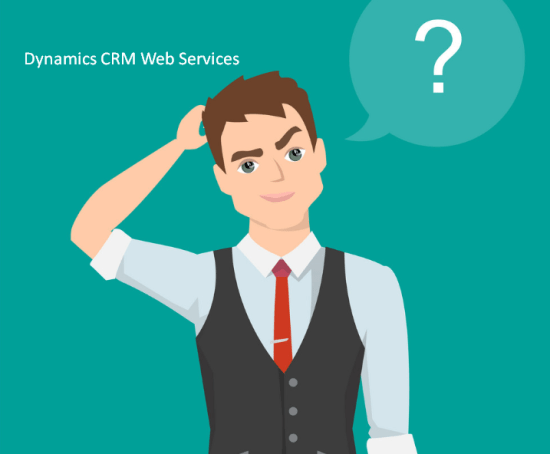
thiking kid

Meet Jerry, he is wondering about dynamics crm services, In this blog I am helping him to understand when he should use which dynamics CRM web service.

Let’s first understand how many services dynamics crm offers post which will discuss which service to be used when:

  1. Web API
  2. Organization Service
  3. Organization Data Service
  4. Discovery Service
  5. Deployment Service

Web API

WebAPI is fairly new for dynamics CRM and i see many developers havent touched upon it. You should be using WebAPI Service while doing Client side development(preferably) such as Javascript, HTML etc. At this point its not easy to use WebAPI on server side but i am sure it will be possible in coming updates. Web API uses ODATA (Open data protocol). It also doesnt need any dynamics CRM related libraries or assemblies. You perform CRUD operation using XmlHttpRequests.  

Organization service

Organization service is basically a SOAP endpoint of dynamics crm and have been available since dynamics crm version 2011.  This Service has to be used with .Net Framework and for Business logic that runs in plug-ins or workflow assemblies on the server expect to use the Organization service.( So nothing client side). To work with Organization you have to use microsoft dynamics crm SDK i,e provided libabries and assemblies to interact with dynamics crm.

Organization Data service

It is also known as Odata service for dynamics crm which is Infact nothing but a “REST” Endpoint. You can utilise Odata endpoint in C# code( a server side code as well) but it is widely used for for client side scripting using javascript. However this has been deprecated with the release of dynamics crm 365 which means it is no longer supported. and completely replace with WebAPI.


Discovery web services

As the name suggest, this service should be used when you have mutiple CRM instances of dynamics crm in single deployment. You would use this service in your plugins ( the server side code) to get the current instance obtain the context.


Deployment web service

This service is barely used by developer as UI options are available. Such as Deployment manager etc. Use this service if you have create , delete or edit a dynamics crm organization/instance. Again its all server side.


I hope this clears your doubt as to when you would use which service and with what programming language.

Cheers!


Error While Connecting To CRM Online Using Kingsway SSIS Connector

Issue:

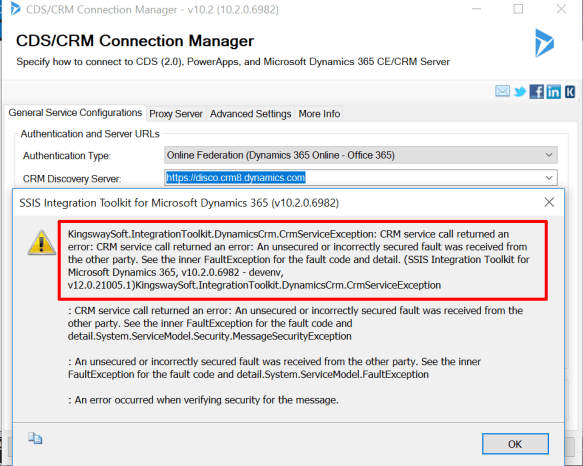
I have recently got this error when i was preparing an SSIS package for Dynamics CRM 365 Online and used Kingsway SSIS connector.

Kingsway1

Resolution:

After digging in further this error is mainly caused by the request and reponse timings,So, when i checked i found out my system time was somehow 5 minutes ahead of the current time, hence the request going to CRM server was of a future time and hence this error showed up.

All i had to do is fix my system time. Sometimes even if your system time is fine, you might still get the error, In that scenario too try to change the time as 5 minutes less.


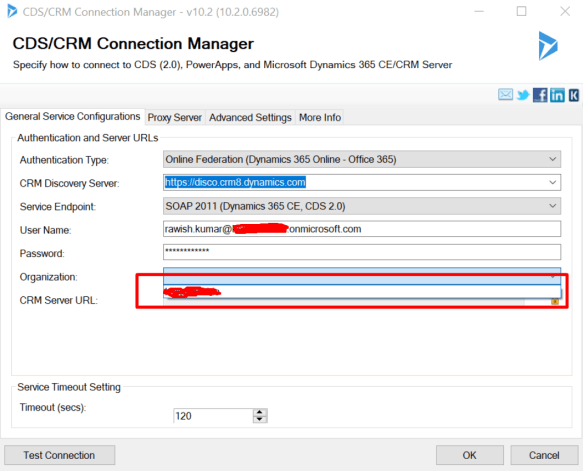
Once i did that -my organisation name popped up without any issue.
kingsway2.png


Hope this helps!

Cheers!


Show Lost and Won Opportunities In A Chart By User/Owner

Just a quick blog on a question asked in dynamics community here : https://community.dynamics.com/crm/f/117/t/293930

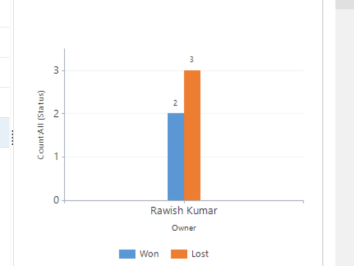
Requirement was to show Lost & Won opportunities grouped by a manager in a Bar Chart:
chart2

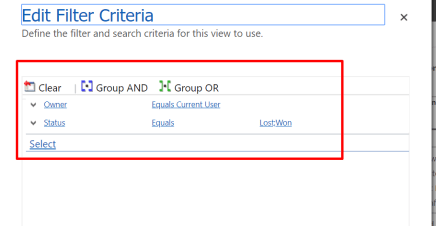
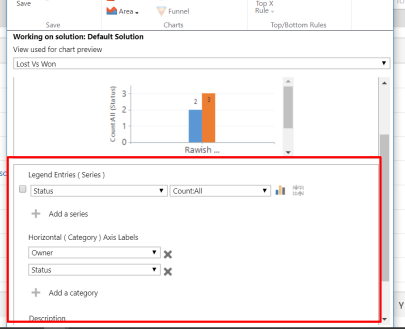
Try below Steps.

  1. Create a view as below :chart3
  2. Create a chart on that view in opportunity as below:chart
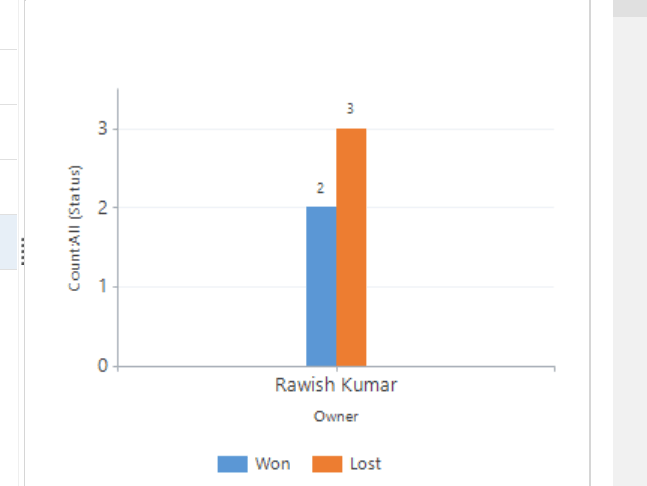
  3.  Save and close & make sure to publish the customisation. Below is the end product.
    chart2


Hope this helps!


Cheers!


Tips For Passing MB2-715 Certification

I have recently passed MB2-715 Microsoft Dynamics 365 customer engagement Online Deployment Certification. It was really fun preparing for this certification and I achieved a good amount of learning. Therefore I would like give my inputs/Tips on this certification to whoever wants to complete it.


What This Certification Is About?

The purpose of this certification is to understand what it takes to plan, prepare & deploy Microsoft Dynamics CRM Online  365 for your client.

From choosing the right plan , number of license to managing multiple instances. All in All this is for people who would like to Admin a dynamics 365 CRM Online.


What will you get out of it?

Obviously a certification, however more importantly full knowledge of dynamics crm 365 online administration. Most of us are typical CRM developers, we hardly get to see how the CRM is being managed, pricing, licensing etc. This certification is a great opportunity to expand your horizon.


How to Schedule the exam ?

Well, you have to go to learning page of microsoft dynamics crm and explore the certification or directly : https://www.microsoft.com/en-us/learning/exam-mb2-715.aspx
it will ask you to chose the date , nearest center where you give exam or even online if you wish to. Finally once you have paid the amount, you are all set.!

Finally, How did I prepare and pass the exam?

I actually selected multiple sources from where i can learn which i would suggest you to take depending on your convenience.


That’s all from me. I wish you all the very best for the exam. Please let me know how it goes!

cheers!


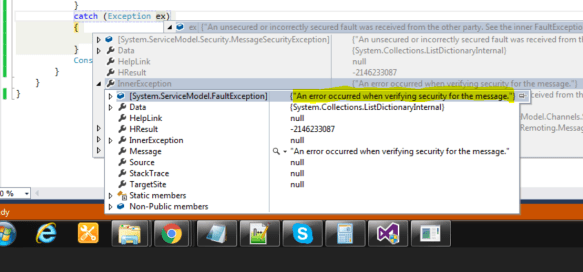
An unsecured or incorrectly secured fault was received from the other party

Issue :

Recently i have encountered this error when i was trying to connect to Dynamics CRM 365 online.

error1.PNG


I digged in further and found a post where couple of suggestions were mentioned :

https://community.dynamics.com/crm/f/117/t/204264

Solution : It was to do with my system settings(Time) – my system time was ahead of the server time. which means the request was going to server with a future time. 

hence i have changed the time in my system clock to be 5 minutes less. Which indeed worked.


I hope this helps!

Simplified Connection To Dynamics CRM 2016 Onpremise Using Console Application

Here is the quick code that i use when i have to build a console application that connects to dynamics crm onpremise version with AD/IFD Authentication.

Main Class:

ClientCredentials _clientCreds = new ClientCredentials();
_clientCreds.Windows.ClientCredential.UserName = ConfigurationManager.AppSettings["username"];
_clientCreds.Windows.ClientCredential.Password = ConfigurationManager.AppSettings["password"];
_clientCreds.Windows.ClientCredential.Domain = ConfigurationManager.AppSettings["domain"];
var organizationUri = ConfigurationManager.AppSettings["CRMUrl"];

_service = (IOrganizationService)new OrganizationServiceProxy(new Uri(organizationUri), null, _clientCreds, null);

OrganizationServiceContext _orgContext = new OrganizationServiceContext(_service);

App.Config:

<?xml version="1.0" encoding="utf-8"?>
<configuration>
<configSections>
<section name="AppSettings" type="System.Configuration.AppSettingsSection, System.Configuration, Version=4.0.0.0, Culture=neutral, PublicKeyToken=b03f5f7f11d50a3a" restartOnExternalChanges="false" requirePermission="false" />
</configSections>
<appSettings>
<add key="CRMUrl" value="https://Oranization.com/XRMServices/2011/Organization.svc" />
<add key="Username" value="rawishkumar" />
<add key="Password" value="password" />
<add key="Domain" value ="exampledomain"/>
</appSettings>
<startup>
<supportedRuntime version="v4.0" sku=".NETFramework,Version=v4.5.2"/>
</startup>
</configuration>


Required Assemblies:

using System.ServiceModel.Description;

using System.Configuration;

using Microsoft.Xrm.Sdk;

using Microsoft.Xrm.Sdk.Client;

Hope this helps!

SQL Connection to CRM Database

Dynamics CRM has very efficient web services using which you can retrieve data such as Organization service Or WebApi. However if you still need to retrieve data from database here is a quick code helper – which i am using in a console application.

//Initiate the connection
using (var connection = new SqlConnection(ConfigurationManager.ConnectionStrings["SQLServerConnection"].ConnectionString))
{
//create a command variable
using (var command = connection.CreateCommand())
{
//add query to your command
command.CommandText = "your SQLquery goes here";

// open the connection first and then execute the query using Execute Reader
connection.Open();
result = command.ExecuteReader();

here is the app.config which i have used , i am using the windows authentication hence you donot need to mention credentials.

<?xml version="1.0" encoding="utf-8"?>
<configuration>
<connectionStrings>
<add name="SQLServerConnection" connectionString="Server=.;Database=events.website;Trusted_Connection=True;"/>
</connectionStrings>
<startup>
<supportedRuntime version="v4.0" sku=".NETFramework,Version=v4.5.2"/>
</startup>
</configuration>

By Now you will have your dataset in “result”; here is another piece of code to read the data:

 if (result.HasRows)
{
 while (result.Read())
{
string contactid= result["columnName"].ToString();
string contact = result["columnName"].ToString();
DateTime createdonDate= (DateTime)result["createdon"];
string type = result["columnName"].ToString();
}

}
// close the result
 if (result != null)
result.Close();


I hope this helps!

Cheers!