Calculation Using Business Rules in Microsoft Dynamics CRM

Hi Guys,

We all love business rules & i am a big fan of them since they save alot of your time developing javascript for small actions that you need perform for e.g from making a field mandatory to setting fields value or showing error message.

Well , fortunately business rules can help if you need to perform some simple calculation on a form based on field values too. Lets get into action.

I have thought of a silly scenario where if i have estimated closed date on opportunity – i would like to set a date of 10 days before the estimated closed on a custom date field that i have created. Based on that i can then perform some other action using this new value either with JavaScript or business itself. This is dynamics crm 365 trial that i am using but its pretty much similar in 2016 or 2015.

So lets create a business role.

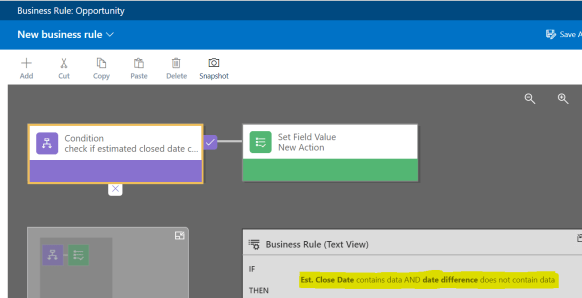
  1. Add a new condition to check if Est. Closed date contains data AND the new field(date difference) doesn’t not contains data.
    please note that if we don’t check the second condition the business rule will run every time and set the value to date difference on every on load even if date difference has been set last time :1
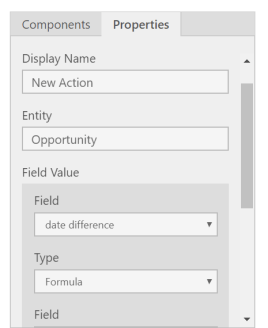
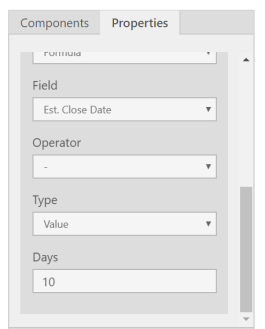
  2. Now once we are done with condition , lets add the action to it “set field value”. and from right side select the field = “date difference” , Type = “Formula”, other field = “Est Closed Date” , Operator = “-“, Type = “Value” , Days = “10”. Take a look at reference below:
    2
    3
  3.  now lets apply , save , Activate the business rule.
  4. Lets open a record a with estimated closed date and see it in action 🙂
    4
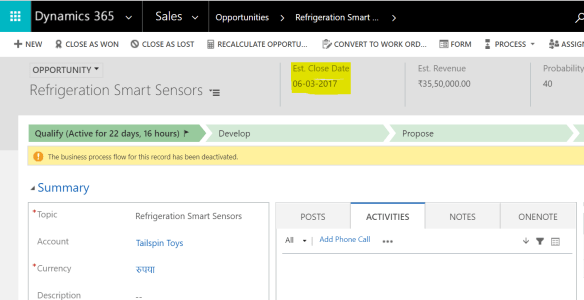
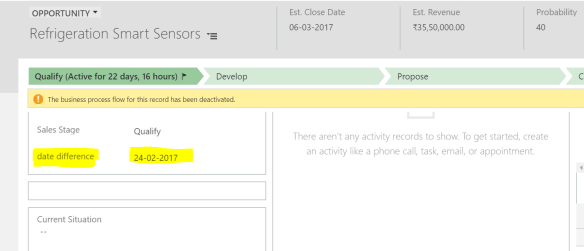
  5. the date difference field has been set to 10 days before the est close date which is 24-02-2017.
    5.PNG

There you go , it was simple example but i am sure you can perform some more complex calculation and not on just date fields but on currency and other fields.

Hope this helps!

Cheers!

Learn Microsoft Dynamics CRM – Basics, Customization & Configuration

aads-education-offers-microsoft-dynamics-crm-training-2-638

In office, while i am blogging or in dynamics community ; i always get this question that how a fresher can start learning CRM. Well let me tell you learning CRM is very easy since it is a Microsoft technology in which we have been living & using from our outlook to windows.

Well on internet ; information is pretty much distributed and in bits & pieces but i have collected the below information in sequence on how you  can you start from zero and go till 100 🙂

  1. First things first you should know what is CRM , well according to microsoft definition is :
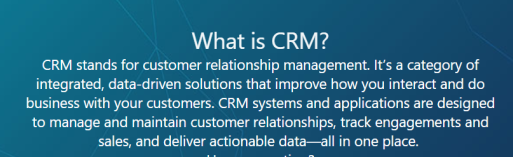
             crm definition.PNG

    “CRM solutions streamline processes and increase profitability in your sales, marketing, and service divisions. A strong CRM solution is a multifaceted platform where everything crucial to developing, improving, and retaining your customer relationships is stored. Without the support of an integrated CRM solution, you may miss growth opportunities and lose revenue because you’re not maximizing your business relationships.”

  2. Next i would suggest you to see above everything in action :  https://www.chalkstreet.com/microsoft-dynamics-crm-tutorial    ,  https://mva.microsoft.com/en-us/training-courses/introduction-to-microsoft-dynamics-365-17593?l=J6OdOYtqD_906312570
  3. Once you have done this – i think you will be pretty much comfortable having your own CRM environment to get your hands dirty in, therefore go ahead and get your trial :https://trials.dynamics.com/
  4. Time to know how CRM can be available to you(to be technical “deployment options available in CRM”) :  https://www.powerobjects.com/2015/10/21/upgrading-crm-crm-online-vs-on-premises-finding-the-best-fit-for-your-organization/
  5. Once you understood all above, my suggestion for you is to now understand the core concepts which makes the whole CRM :

https://www.tutorialspoint.com/microsoft_crm/microsoft_crm_overview.htm

In this tutorial you will learn about what are the core components of  CRM like Entities , Fields, Forms, Business process flows etc. This blog also pretty much explains how you can customize the crm.

6. Now go though this blog and do same in your trial version :

https://crmbook.powerobjects.com/system-administration/customization/

i will talk about customizing, fields, forms , entities , charts, dashboards,solutions etc.

7. Security model – Now this is a major topic which you must understand very well without which it will be very difficult for you to master dynamics crm else you will be missing out on very small/minor things during your career

https://www.youtube.com/watch?v=_vfp3C11a3Mhttps://www.youtube.com/watch?v=An-VgsHEp9A

8. Now , one of the main features of crm is “Processes” , processes are the main component in CRM which helps you to perform actions based on your needs :

a. business rules :  http://www.inogic.com/blog/2016/12/business-rules-dynamics-365/

b. Workflows :  https://crmbook.powerobjects.com/system-administration/processes/workflows/

c.Plugins :  https://crmbook.powerobjects.com/extending-crm/plug-in-development-and-workflow-extensions/plug-ins/developing-a-plug-in/

9.Apart from it most of the stuff you would do through JavaScript which you coudnt  using business rule, mainly javascript is used to perform complex logics else i always recommend you to use business rules  :  https://www.youtube.com/watch?v=wxMB-cIQPUw


if you go through all of the above carefully , you will be in a position to work on dynamics crm confidently.

Please leave your comment if i have missed out anything major or you have any question, need guidance on any of the topics above.

happy crm learning, cheers!

Lock all fields on a form using Javascript- Microsoft Dynamics CRM

Hi Guys,

We all get requirements to lock the whole form to stop people from editing the record.

There are some out of the box options available to achieve this :

  1. Create a business rule : you can easily create a business and use lock field feature however you will have to select all the field on the form one by one – for .e.g if you have 50 fields on the form, you will have to add action for all of them. Moreover another limitation is if a field is removed from the form – you business rule will stop working.
  2. We all know if record is status is set to inactive – form become uneditable but in this scenarios we want to keep the record but uneditable.

Therefore, we come down to our final easy solution to tackle all problems above, the Javascript. Have a look on the below code :

 function disableFormFields()

{

       Xrm.Page.ui.controls.forEach(function (control, index) {

           var controlType = control.getControlType();

           if (controlType != “iframe” && controlType != “webresource” && controlType != “subgrid”)

           {

               control.setDisabled(true);

           }

       });

}

above code takes the control of the form directly rather then of each field & locks all of them. Just call the function on Onload , I have used this on my form and it looks like below:

lockfield


Now you can definitely add your own logic into this code for .e.g you put a if condition to check some value based on which you want to lock all fields and another things if you need to leave some fields unlocked you can again you a if condition , check the value and use below

just add the below code to above code :

if (crmfield = abc)

{

Xrm.Page.ui.controls.get(“CrmFieldShcemaname1”).setDisabled(false);

Xrm.Page.ui.controls.get(“CrmFieldShcemaNam2”).setDisabled(false);

Xrm.Page.ui.controls.get(“CrmFieldShcemaNam2”).setDisabled(false);

}


hope this helps you!

cheers

How to insert dynamic values from custom entities in an email template – Microsoft Dynamics CRM

if you work with email templates; you might have to create a template which is to be sent from a custom entity & hence you will need field values from that entity.

Now out of the box – CRM doesn’t provide you an option to populate the field values from a custom entity.

So lets dig in and understand ; how this can be done.

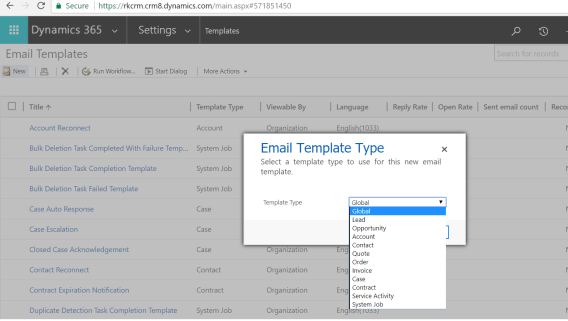
1.Go to Templates from CRM settings and click on email templates ; click on “new” & in the popup select template as “Global”:

1

now if you notice – CRM gives you templates for individual entities as well but since we need one for custom entity – we will have to select global.

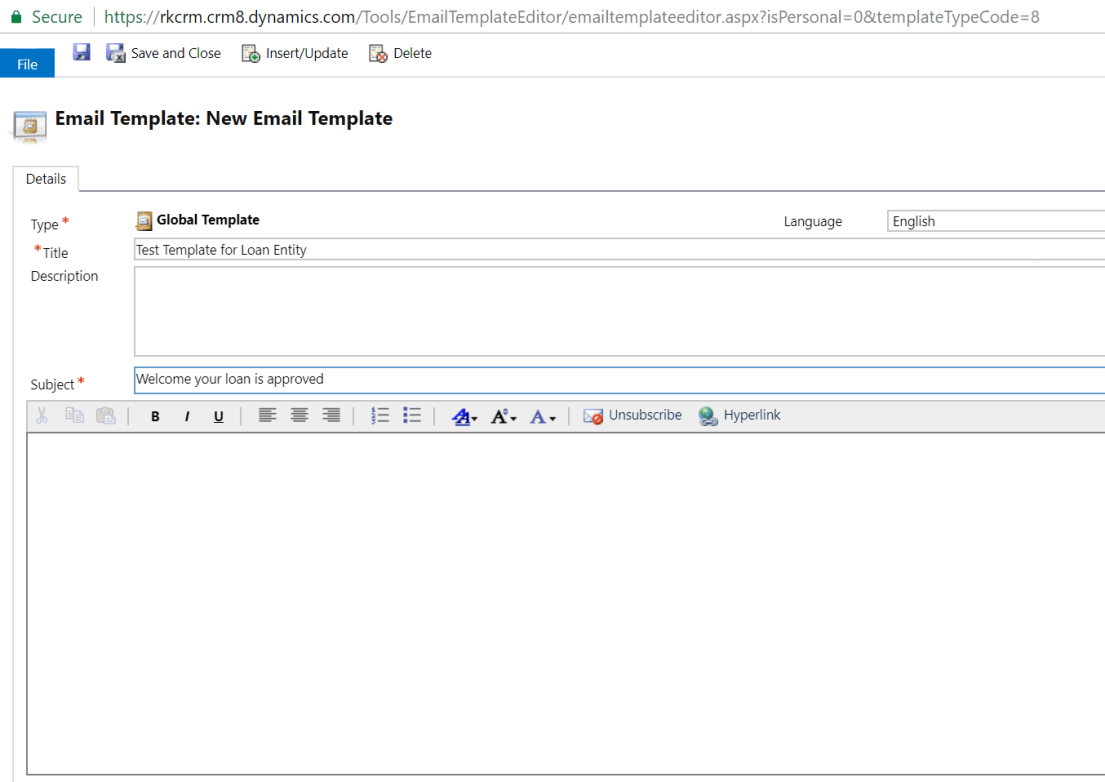
2. In the Template form, fill subject & Title.

2

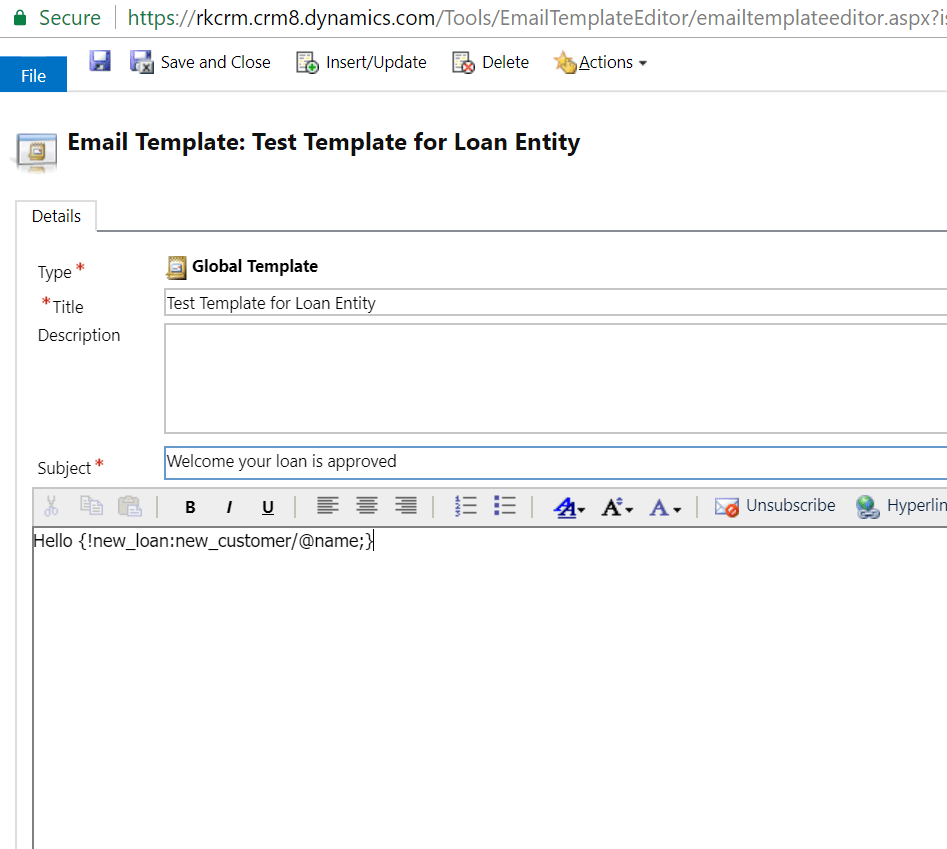
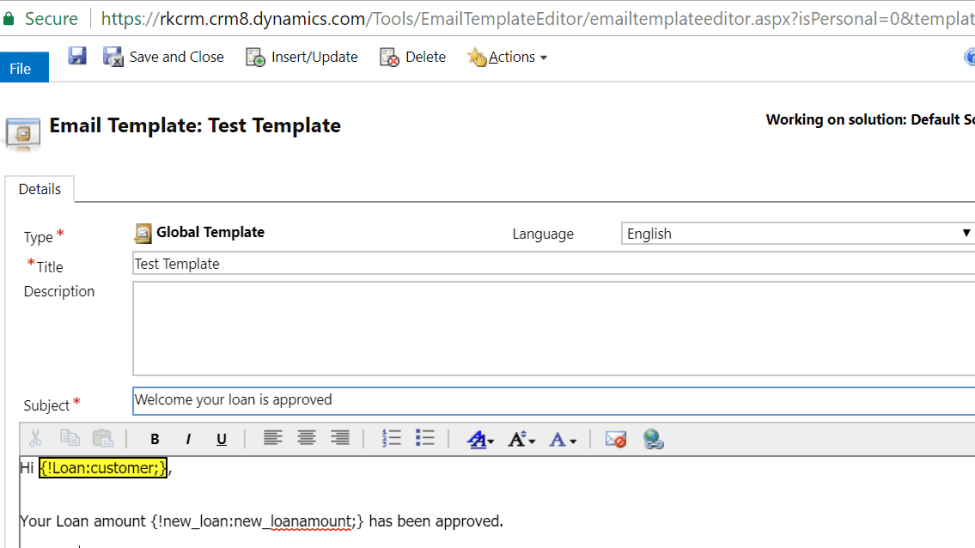
3.In this example – i have a custom entity Loan, i would like to send email from this entity using an email template with Loan amount and customer populated. Customer is a lookup so lets do it.

Standard format is : {!EntityLogicalName:FieldLogicalName;}

for lookup values ; you would want to retrieve the name so you have to do it like below :

3

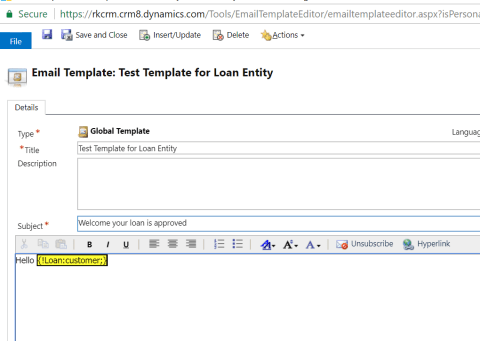
4. Hit save and it will be resolved:

4.png

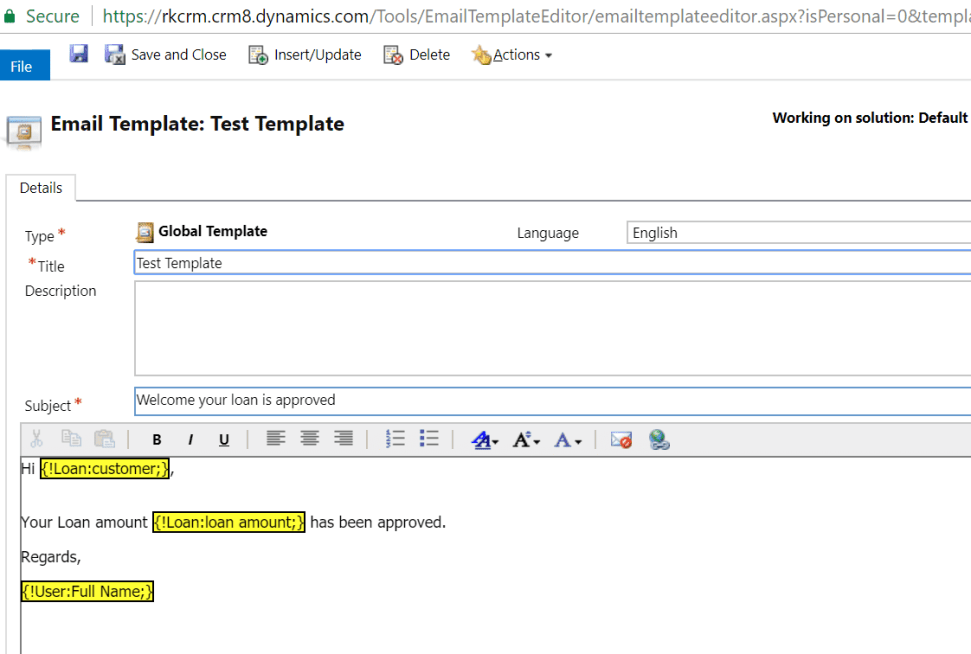
5. now lets retrieve the loan amount which is a currency field:

5

6. Hit save and see the how this resolves as well:

6

if you have noticed – i have also inserted the current user name from out of the box feature “insert/update” from top button.

Similarly, you can do this with other fields like below :

single line of text : {!EntityLogicalName: FieldLogicalName; Default Text}

Date :  {!new_loan:new_approvaldate/@date;}
Time : {!new_loan:new_approvaldate/@time;}

Lookup : as we did above

Optionset : {!new_loan:new_loantype/@name;}

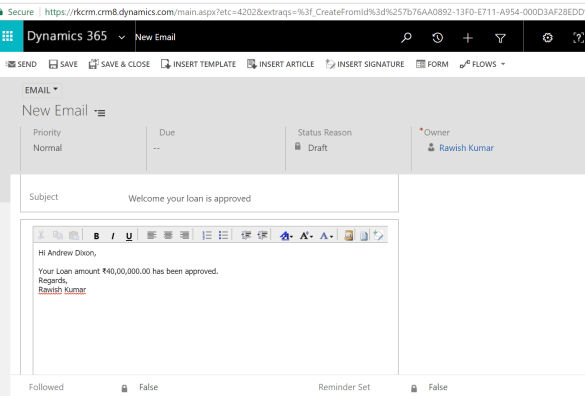
7. Now lets see our template in action ; i will go the loan entity record and insert a template:

7

Yay! it worked like a charm.

so , that is how it is done. Let me know if you face any difficulties.

Cheers!!


Create a Gantt Chart in MS CRM

Nice blog by crm chart guy – made it look easy and simple.

Ulrik (CRM Chart Guy)'s avatarcrm chart guy

Until recently I thought that Gantt charts couldn’t be done in MS Dynamics CRM without turning to some serious development, which I found unfortunate because this is a popular type of chart and users find them easy to read. Turns out you can, and it’s not that difficult to create a simple Gantt Chart in MS CRM.

EDIT regarding CRM2011: This post relies on changing the aggregate of a date field to “min”, which seems to be exclusive for CRM2013. CRM2011 will give you an import error when you make that change to the xml. However, a reader has been kind enough to send me the details of how make it work for CRM2011. In the fetchxml you will need to remove the aggregate=”min” from each of the attributes, and also remove the groupby=”true” along with its corresponding alias in the categorycollection. Thank you Nils for sharing.

In this…

View original post 1,163 more words

Run On-Demand Workflows on bulk records using XrmToolBox – bulk workflow execution

Microsoft Dynamics CRM On-Demand workflows are great and help in so many ways/

you can easily run these on records such as 100 , 500, 1000 & may be on 2000? But wait… how about 10000 records? thats where it might become very hectic but with introduction of a new plugin/tool in XrmToolBox – it has become very easy. – thanks to Andy Popkin 🙂

All you have to do is download XRM toolbox from the main website or github :

https://www.xrmtoolbox.com/

https://github.com/MscrmTools/XrmToolBox

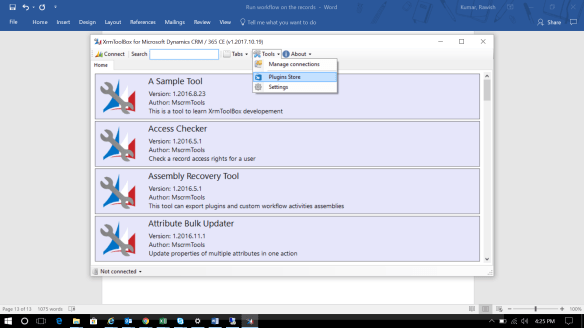
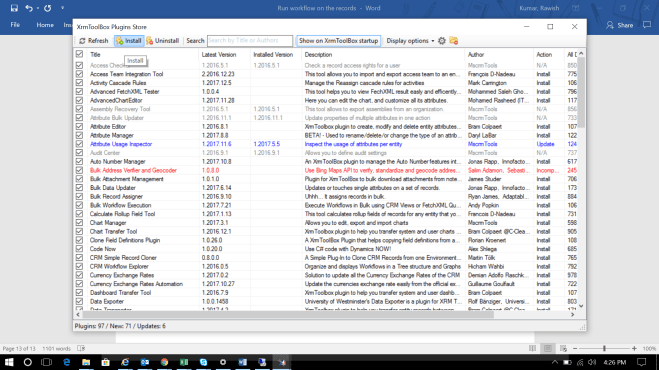
Now once you have this tool and extracted – you might not have the bulk workflow execution tool in it. you will have to go to plugin store from the xrm tool and add it as belowpluginstore

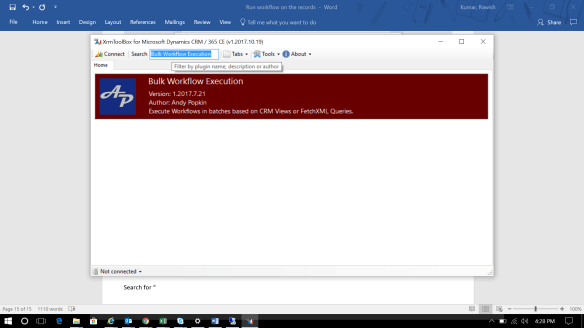
once you go there it will give you hell lot of plugins you have to look for “bulk workflow execution” plugin and install it as below :

installplugin

once this is done you should be able to search this tool in your XRMtoolbox :

search&run

double click on it and get into action

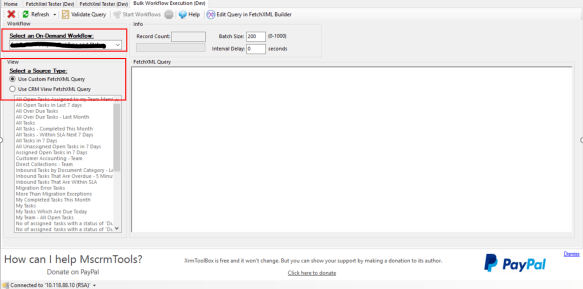
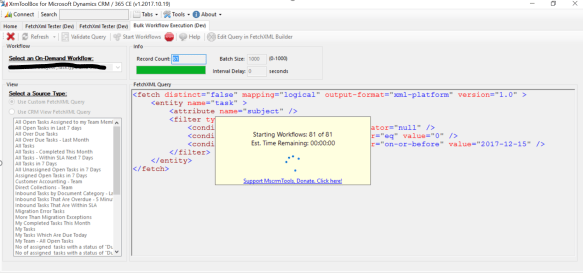
  1. make sure your workflow is already is configured to run as ondemand
  2. all ondemand workflows in the organization will come under the dropdown i have highlighted.
  3. once you select the wofklow – it will give a list of all views from the entity which is a primary entity of the workflow. you can select the view and run your workflows on view returned records.
  4. you can also define your own custom fetch XML query ; which we will do now.

1

here i am using the below fetch XML as an example :

<fetch distinct=”false” mapping=”logical” output-format=”xml-platform” version=”1.0″ >

<entity name=”task” >

<attribute name=”subject” />

<filter type=”and” >

<condition attribute=”scheduledend” operator=”null” />

<condition attribute=”statecode” operator=”eq” value=”0″ />

<condition attribute=”createdon” operator=”on-or-before” value=”2017-12-15″ />

</filter>

</entity>

</fetch>

2

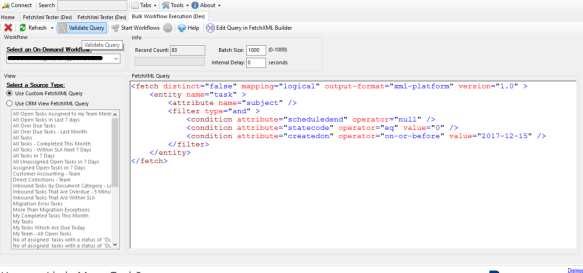
you can click on validate to validate your query ; once your query is confirmed you will have run workflow button enabled next to it and also will show how much record it has retrieved. click on the run workflow button and see the action :

3

it will work like a charm and will definitely save alot of your time.

i will be sharing more cool add-on in XrmToolBox because i am a fan of this tool ; so stay tuned.


cheers!


Escape from waiting condition workflows – Microsoft Dynamics CRM

Waiting condition workflows are definitely great and almost perfect for the functionality where you have to wait for months for something to be triggered.

but are they really good ; should actually keeping them alive for months is a good idea? Well there are certain measures that you can take if you really need them :

  • Combine waits and check condition. So you have a process that emails a customer service representative three days after the case is open. No need to email them if the case has been closed, right? After the wait, have the workflow check conditions to verify that the condition that triggered the workflow is still true. If not, cancel , but stop it.
  • Use a child workflow to do something when wait time is over.
  • Use short wait periods. 20  minute waits are ok. 1 year waits are bad.
  • Use timeouts rather then wait condition.


however apart from the above there is another way which can be effective in terms of your organization performance.

Create an entity to keep the crucial date or timestamps on which you want to do something.

  1. create an entity(workflow task) , with fields as “regarding” & “Due date”.
  2. In your workflow – if you need to do something for example 20 days before the expiration date – calculate that date and create a a new record for the entity created(workflow task) with regarding as the current record and the date in due date field.
  3. Stop your workflow – just end it right there.
  4. Create a bulk delete job -that you should run everyday which checks for the records who’s due date is today and delete them.
  5. Create a workflow on the new entity created(workflow task) – run it on deletion of the record and do the actual things you wanted to on your record from that workflow for example closing the activity , sending email etc.


Best thing about this approach this that you can continue using this logic in your organization with n number of records & entities.


let me know your thoughts on this.

Cheers !

Sample Questions & Tips for Exam MB2-713: Microsoft Dynamics CRM 2016 Sales

It is the most difficult and interesting crm certification i have come across.

i am going to give you some tips and sample questions that you can expect.

  1. understand the CRM sales process : https://crmbook.powerobjects.com/basics/microsoft-dynamics-365-sales-process/
  2. guidance from a champion : https://neilparkhurst.com/2016/03/28/mb2-713-certification-microsoft-dynamics-crm-2016-sales/
  3. finally some sample questions:

1.Your Dynamics CRM organization uses Microsoft Yammer.
You plan in enable integration with Yammer to replace the default CRM activity feeds.
You need to identify which security rights are required to enable the integration.
Which two security rights should you identify? Each correct answer presents part of the solution.
A. Dynamics CRM administrator
B. Dynamics CRM System Customizer
C. Yammer administrator
D. Microsoft SharePoint administrator
E. Microsoft Office 365 administrator

Answer :AC

2. You Open the My Open Opportunities view,
You need to export the data in the view, and then to reimport the data so that the existing records are
updated.
What should you do?
A. Export the data as a dynamic Pivot Fable.
B. Export the data as a Static worksheet.
C. Export the data and select the Make available for re-import option.
D. Export the data as a dynamic worksheet

Answer : B

3.You have a recalled product that should no longer be sold.
You need to remove the. Product from the available list of products and to prevent any sales from being
processed for the product.
Which two actions should you perform? Each correct answer presents part of the solution.
A. Remove the product from the family hierarchy.
B. Modify the open opportunities.
C. Update the price list.
D. Retire the product.
E. Modify the validity date of the product.

Answer:BD

4.You have an existing customer named customer1.
You have a new add-on product for an existing product that you sell.
You want to offer the add-on product to a customer who has purchased the existing product already.
You need to track the sales initiative in Dynamics CRM.
What should you do?
A. Update the original opportunity record.
B. Create a new opportunity record for the new offering.
C. Create a sub-account for the new offering.
D. Reopen the original opportunity record.

Answer : B

5.Your marketing team is promoting a sale that they will announce by using email. The email message will
be sent to existing customers who recently purchased similar products and to potential customers from
a purchased mailing list.
Any sales made as a result of the sale need to have the pricing applied, the sales must be tracked so that
the marketing team can report on the return on investment (ROl) of the initiative.
What are two possible ways to achieve the goal? Each correct answer presents a complete solution.
A. Convert the email activities to leads.
B. Convert the campaign response activities to opportunities.
C. Convert the campaign response activities to leads.
D. Convert the email activities to opportunities.

Answer : BD

6.You have a Dynamics CRM organization that has several currencies enabled. What occurs when a user
creates a record that has a currency field?
A. The currency is based on the sales territory of the user.
B. The currency is based on the location of the user record.
C. The currency is converted into the base currency and is always displayed in the base currency
D. The system default currency is the record default, unless a customer has a default currency

Answer : D

7.You company employs consultants who bill customers for their time.
You sales team is responsible for selling the consultants time, in addition to selling product licenses.
You need to provide the sales team with the ability to create opportunities, quotes, and invoices for the
consultant’s time.
What should you create first?
A. a product family
B. a price list
C. a product bundle
D. a unit group

Answer 😀

8.Your company plans to deploy Dynamics CRM.
In the previous sales database, you did not track products
Members of the management team are evaluating whether to use the product catalog in the CRM
organization. You need to identify which enhancements to the sales flow can be achieved by using the
product catalog. What are two possible enhancements that you can identity? Each correct answer
presents a complete solution.
A. inventory management integration
B. automated sales pipeline velocity tracking
C. automated revenue calculation
D. automated quotes, orders, and invoicing

Answer :CD

9.Your company has a Dynamics CRM organization.
The company plans to use the product catalog.
You need to identify which component must be configured before you can implement the product
catalog.
A. product families

B. product
C. price lists
D. unit groups


Answer : D

10.You need to identify which type of object can be associated to sales territories. Which type of object
should you identify?
A. Opportunities
B. Users
C. Leads
D. Facilities
E. Teams

Answer : B


Hope this helps

you can write to me @ rawish_kumar93@hotmail.com if you need any support.

Cheers!

The CRM Mailbox incoming and outgoing email field is setting to “None” Microsoft Dynamics CRM 2016

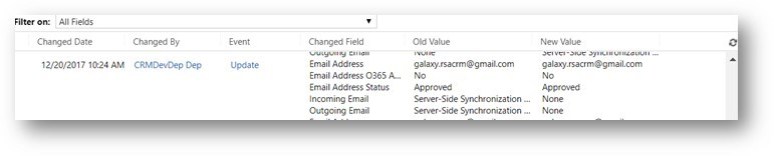
I had a strange issue in production ,so whenever we were doing a deployment ( reference data +solution). After the deployment the mailbox settings incoming email and outgoing is getting set to “None” rather then “Server – side synchronous or email router”.

After performing multiple steps/deployments; I  found the solution to this issue.

I use migration utility tool to export and import the reference data.

Please see below steps:

  1. Removed the default mailbox field from the queues schema, exported the data and deployed to internal test. However it didn’t work and still was taking the incoming outgoing setting from dev; hence made it none again. <field displayname=”Mailbox” name=”defaultmailbox” type=”entityreference” lookupType=”mailbox” />


1

2. Then I started looking these two fields (incoming and outgoing email) in the schema and found below :

<field name=”incomingemaildeliverymethod” value=”0″ />

<field name=”outgoingemaildeliverymethod” value=”0″ />


I removed these two properties and I could see it was excluded from the mailbox update.

2

moral of the story : queue will have so many fields dedicated for its mailbox. we have to make sure what will update what.

hope this helps

cheers!!

Microsoft Dynamics CRM 2016/2015/2013- Dynamic and Static Marketing List

This has been a most population concept in marketing module of CRM ; i would like to share some crucial difference between them:

Dynamic marketing lists is able to save time and ensured that everyone that should be on the list was on the list.

A Static marketing list is a snapshot in time. You add the contacts you want in that marketing list depending on certain criteria…and that was it. If a new contact is added to the CRM database you can manually add them to the marketing list, or if the marketing list is no longer relevant to a contact you can manually remove them.

Dynamic marketing lists removes the manual element. You can create a query (e.g. all customers where their country equals Ireland). This means that any contacts with “Country = Ireland” will be added to the list. As you add new contacts to the CRM database, they will automatically be added to the marketing list if they live in Ireland. If a contact moves and the Country field in the contact card is updated, then they will be automatically removed from the marketing list.


Some other major differences below :

Dynamic List Static List
Member types Leads, Contacts or Accounts Leads, Contacts or Accounts
Adding members The query to select members automatically adds records which meet the criteria You can manually add records using the Add to Marketing List button
Manage Members – Add records using a lookup
Manage Members – Add records using an advanced find
Removing members Members are automatically removed if they no longer meet the dynamic list query criteria Manage Members – Advanced find to Remove records
Manage Members – advanced find to evaluate members
Blocked attribute You cannot block a dynamic list (you can use the copy to static button to copy the members of a dynamic list to a new static marketing list) You can block a static list, which stops members being added or deleted.
Updating list members automatic Manual – a static list has to be updated manually.
deactivated records/members Automatically excluded from the list
Can lists be added to a campaign Yes – All marketing lists can be added to a campaign and both static and dynamic can be added to the same campaign Yes – All marketing lists can be added to a campaign and both static and dynamic can be added to the same campaign


Happy CRM 🙂 cheers!!